How to Collect Missing Bills
Schedule the Bills Collector Agent to email vendors automatically when you've paid them but haven't received a bill — escalating tone, per-vendor cooldown, no human nag-list to maintain.
- An Artifi account with the Bills Collector Agent enabled
- Vendor payments posted that have no matching bill (the reconciliation agent's 'unmatched payments' bucket)
- An email address on each vendor — or a fallback (default_ap_contact_email or org owner email)
Every accounting team carries the same backlog: payments your operations team made to vendors who never sent a bill. The treasurer asks for the invoice for closing books, you check the inbox, you find a wire confirmation but no PDF. You email the vendor — friendly the first time, firmer at three weeks, urgent at the end of the quarter. By December the spreadsheet of "still chasing" has 50 lines and the auditor wants a sample.
The Bills Collector Agent is the autopilot for that loop. Once a day it scans posted vendor payments that have no reconciled bill, groups them by vendor, picks the right tone based on payment age, composes a polite email via Haiku, and sends it from your AP inbox. If no reply comes in within the cooldown period, the next run picks up where this one left off — same vendor, escalated tone.
This guide schedules the agent, fires it manually so we don't wait until tomorrow, walks the resulting email, and shows where it lives in the dashboard.
How the agent decides who to email and what to say
The decision tree is intentionally boring — same logic every time, no LLM required to decide what to do, only to compose:
- Find unmatched payments. Vendor payments (
AP_PAYMENT,AP_PREPAYMENT,AP_REFUND) withrecon_status IS NULL, posted within the lookback window, amount ≥min_payment_amount. The reconciliation agent's leftovers from the prior step. - Bucket by age. Each payment falls into one of three escalation brackets — friendly (0–7 days), firm follow-up (7–21 days), urgent final reminder (21+ days). The age is calculated from the payment date, not from the prior reminder.
- Filter by cooldown. If a vendor was already emailed within
notification_cooldown_days(default 7), skip them this run. Prevents spam when the daily schedule fires. - Resolve the recipient. Per-bracket override → vendor's
email/billing_emailfield → last bill sender →default_ap_contact_email→ org owner email. If none of those resolve, the vendor is logged as a skip with reason "No recipient email." - Compose the email. A short Haiku call generates the body — pulls in the payment date, amount, description, age in days. The subject is the bracket's prefix + vendor name (e.g.
URGENT: Missing Bills — Notion). - Send via Resend. Tagged with
agent: bills_collector, recorded back on each payment's metadata so the audit trail captures who chased whom and when.
The whole thing runs in 2–4 seconds for a few dozen vendors. Cost is minimal — one Haiku call per email, hardcoded fallback if Haiku errors.
Step 1: Find the agent and review its configuration
Navigate to Agents → Definitions and click Bills Collector Agent. The Configuration tab shows the escalation ladder and tunable parameters.
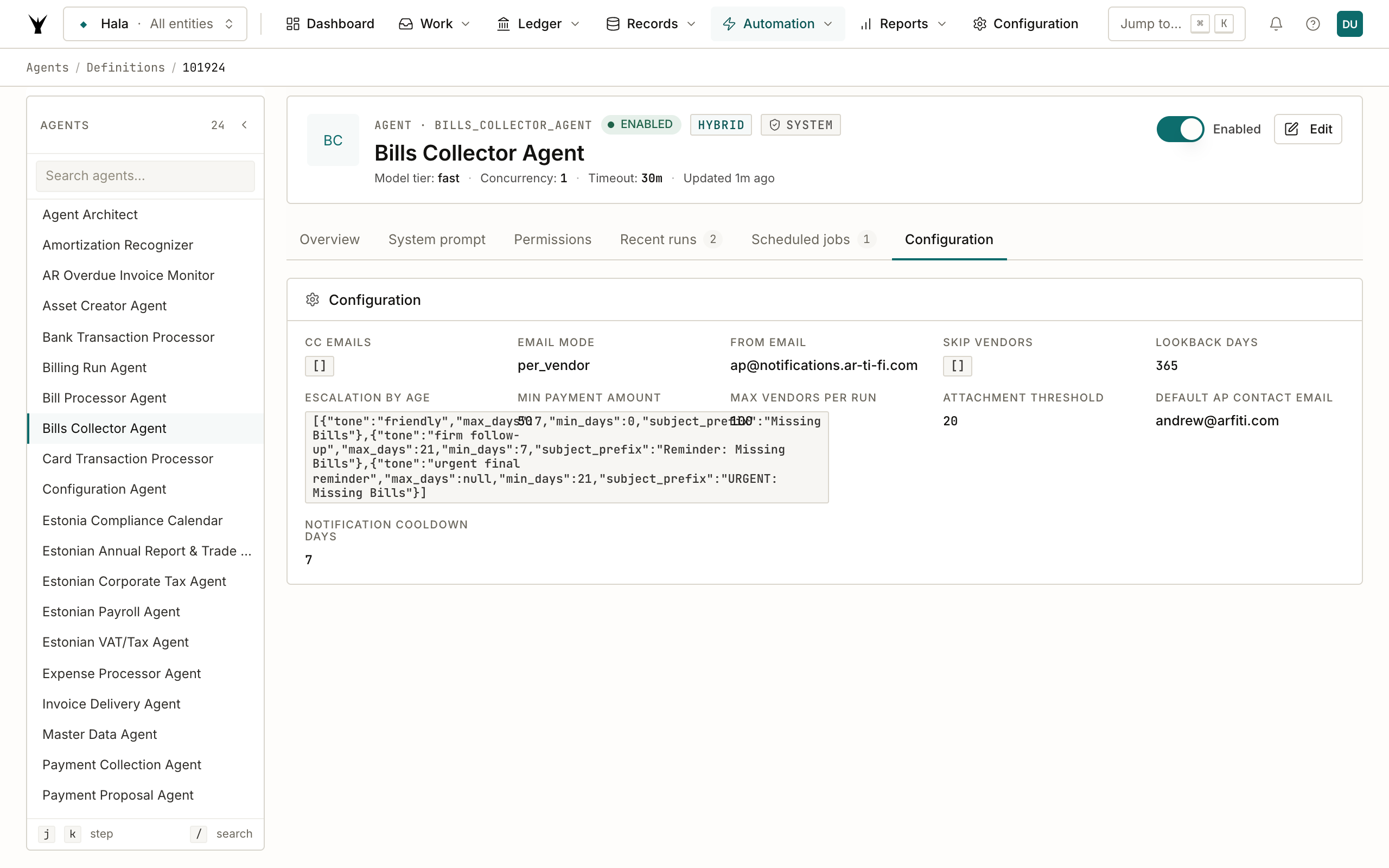
A few settings worth understanding:
email_mode: "per_vendor"— one email per vendor with a list of all their unmatched payments. The other option,consolidated, sends one email summarizing every vendor — easier to scan if you're chasing 100 vendors at once, more work for the vendor on the receiving end. Per-vendor is the default and almost always the right call.min_payment_amount: 50.0— don't bother chasing tiny payments. Raise this to 500 or 1,000 if you only care about material amounts; lower to 10 if you want completeness.notification_cooldown_days: 7— even if you run the agent daily, the same vendor only gets pestered once a week. Different vendors are independent, so the agent still finds new misses each day, just doesn't re-email the same one.escalation_by_age— three brackets is the sane default. Each bracket has its own subject prefix and tone hint that goes into the Haiku prompt. You can add a fourth bracket if you want a "polite first nudge" that's even gentler than the friendly default, or override the recipient per bracket (e.g. CC the vendor's account manager when it goes urgent).
The recipient fallback chain is the part most teams customize for production. If your AP team has a shared inbox like ap@acme.com, set that as default_ap_contact_email so the team gets cc'd on every vendor chase. The org-owner fallback is the safety net for when nothing else resolves.
Step 2: Schedule the agent for daily runs
Open Agents → Scheduled Jobs and click + New job. Pick the Bills Collector Agent, daily at 06:00 UTC, save.
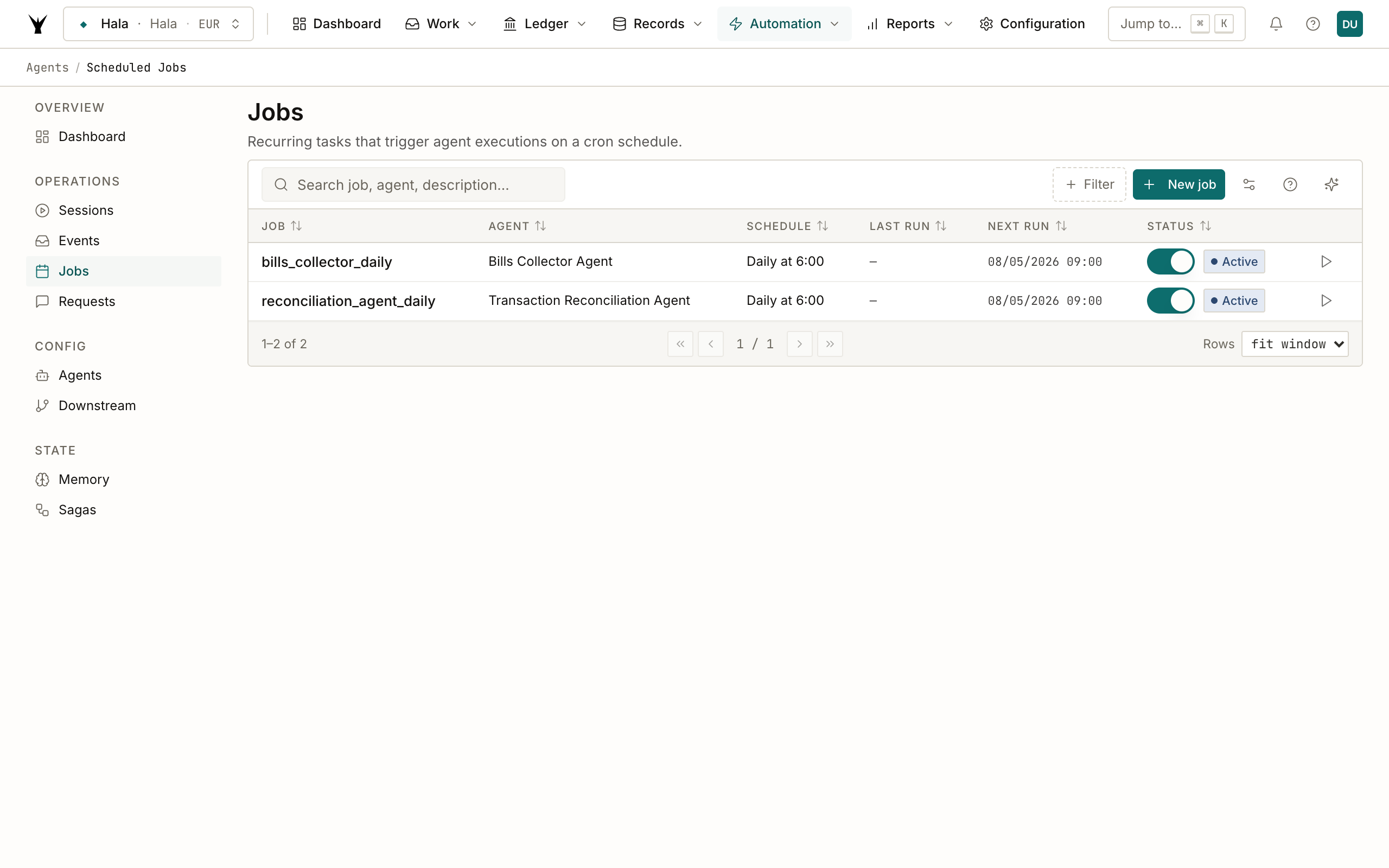
The agent is also wired to fire automatically right after the reconciliation agent completes (event vendor_reconciliation.completed), so on most days you don't even need the cron — it runs in tandem with reconciliation. The daily fallback catches anything where the reconciliation event didn't propagate cleanly.
Step 3: Trigger it manually for the demo
Click ▶ Run now on the scheduled job. The agent runs in 3 seconds, finds Hala's one unmatched vendor payment (PAY000052 — €96 to Notion from October 2025), and sends a single email.
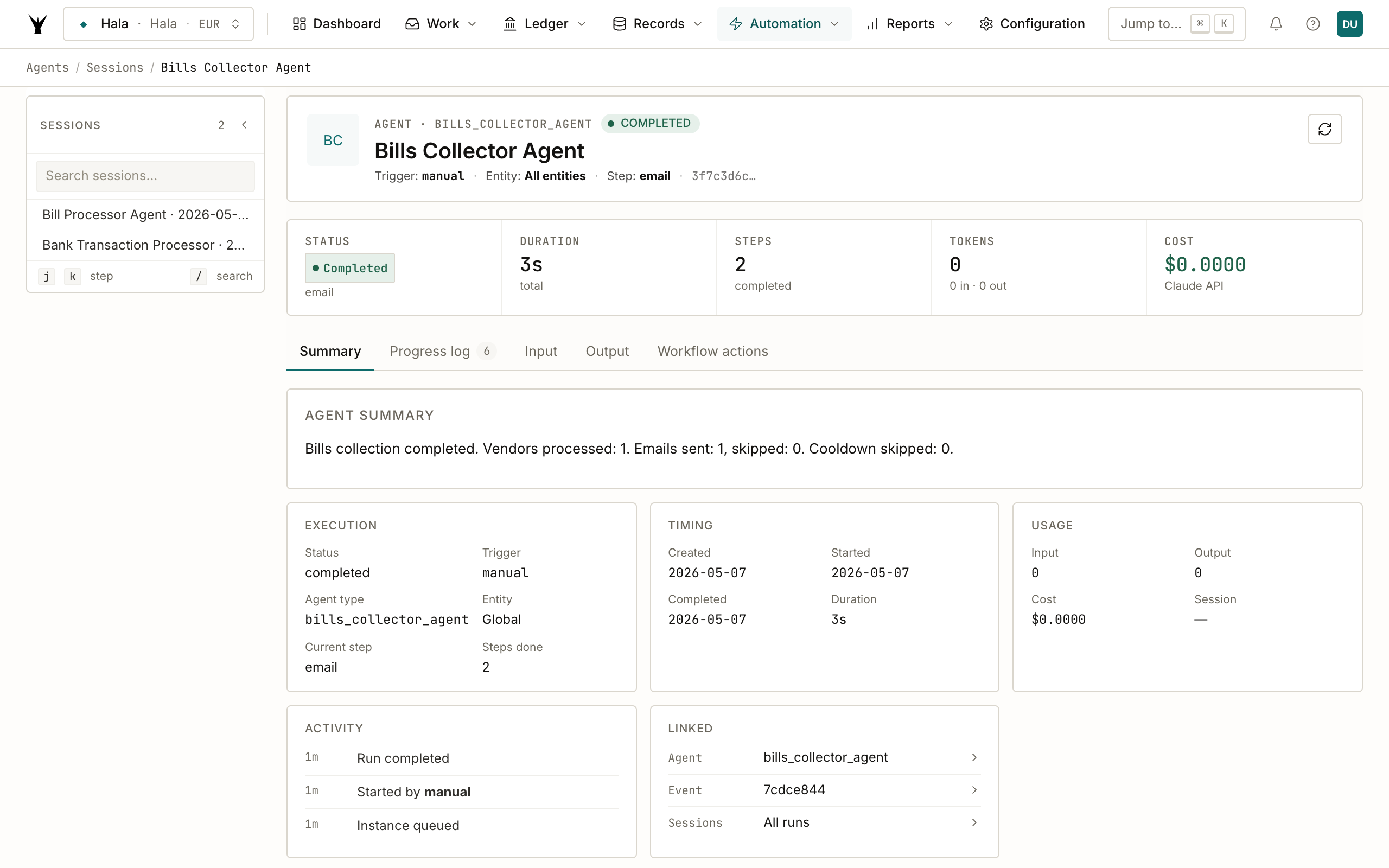
The session detail shows what the agent did: 1 vendor processed (Notion), 1 email sent, 0 skipped (the vendor had no email so the fallback kicked in), 0 cooldown skipped (this is the first run for this vendor).
The Progress log tab on this page is worth checking after a real production run — it lists each vendor the agent considered, the bracket each payment landed in, the resolved recipient, and any skip reasons. The audit trail is structured enough that you can pull a CSV of every chase email sent in the last quarter for an SOC 2 evidence pack.
Step 4: The email
Switch to your inbox. The email arrived from bills.ee-main.hala@mail.ar-ti-fi.com (Hala's per-entity AP address) with subject URGENT: Missing Bills — Notion.
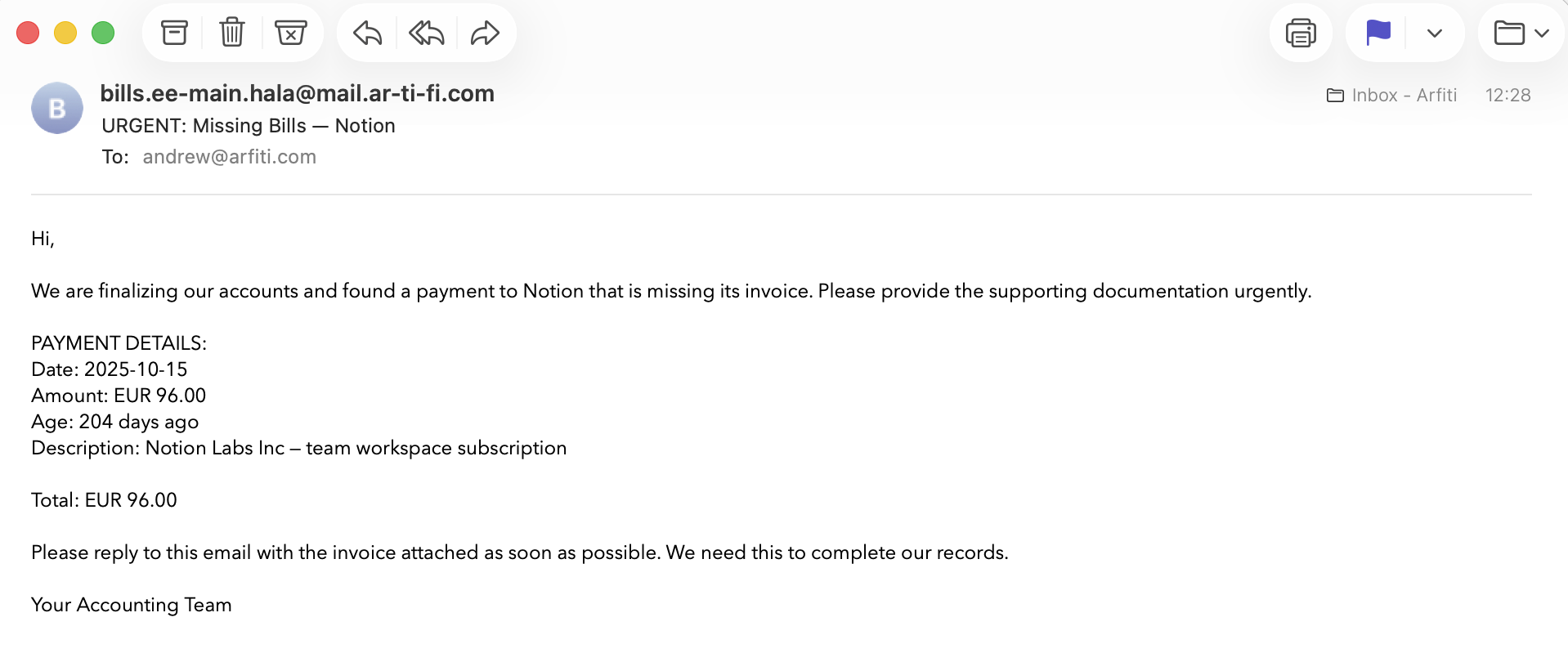
The Haiku-composed body covers the structure auditors expect from a chasing email:
- Greeting + intent — "We are finalizing our accounts and found a payment to Notion that is missing its invoice."
- Payment details — date, amount, age in days, line description from the original transaction. The agent pulls these straight from
transactions.transaction_date,amount,descriptionso the recipient can match against their own AR records. - Action requested — "Please reply to this email with the invoice attached as soon as possible."
- Signature — a generic "Your Accounting Team" because we haven't configured a specific signer. Set
email_signaturein the agent config to override.
The age (204 days) tells the recipient how delinquent this is from your point of view. The agent picks the URGENT subject prefix automatically because the payment is well past the 21-day threshold for the urgent bracket.
If the vendor replies with the invoice attached, it lands in the same Hala AP inbox (bills.ee-main.hala@mail.ar-ti-fi.com) — which is exactly where the Bill Processor Agent is listening. The reply gets picked up, parsed, the bill posted, and the next reconciliation run pairs it with the original payment. The full loop closes without anyone needing to forward, file, or click.
Step 5: What the agent doesn't do
It doesn't:
- Send to the vendor when no email is on file. If
vendors.emailandbilling_emailare both blank, the agent falls back to the configureddefault_ap_contact_emailand finally the org owner. In our demo above, Notion has no email, so the chase email landed on the org owner's inbox. In production this means: enrich vendor records with email addresses early, or accept that internal-only chase emails will accumulate as an internal todo list. - Auto-resolve replies. Reply parsing happens in the Bill Processor Agent, not here. Bills Collector's job is just outbound.
- Mark anything paid or matched. It doesn't change
recon_status. The reconciliation agent still owns matching; this agent just nudges humans to send what's missing. - Send during cooldown. Even with daily runs, the same vendor doesn't get pinged twice within the 7-day window.
- Count payments below
min_payment_amount. Tiny prepayments and bank fees stay in the queue but don't trigger emails.
Common Issues
| Problem | Cause | Fix |
|---|---|---|
| "No unmatched vendor payments found" — but you know there are some | The lookback window (default 90 days) cuts them off | Raise lookback_days in the agent config. We bumped Hala's to 365 because the demo data is from October 2025 |
| Vendors with the same email getting one email each | email_mode: per_vendor — that's by design | Switch to email_mode: consolidated for one summary email at a time covering all vendors |
| Email landed on org owner not on vendor | Vendor record is missing email or billing_email | Edit the vendor in Records → Vendors and add the AP contact email. The next run will email the vendor directly |
| Same vendor emailed two days in a row | notification_cooldown_days set lower than your run frequency | Default is 7. If you run hourly, set to at least 24 hours expressed in days |
| Tone feels off — too friendly for an old debt | The age bracket boundaries don't match your urgency curve | Edit escalation_by_age to add brackets (e.g. polite at 0–14 days, firm at 14–45, urgent at 45–90, demand at 90+) |
| Agent fired but no email arrived | Resend API key not configured for the org, or the org's notifications from-address isn't verified | Check Configuration → API Keys → Resend and the from-address verification status |
Next Steps
- Reconcile Transactions — the upstream agent that decides which payments are "unmatched" in the first place
- Automate Bill Processing — closes the loop when the vendor replies with the invoice attached
- Process Bank Statements — where the original AP payments came from
The same procedure runs daily under governance — agents propose, your team approves through risk lanes, and every write lands as an immutable audit row.