How to Plan a Budget
Build a full annual operating budget from a slash command — Claude reads your prior-year GL actuals, applies your growth assumptions, and submits a 12-month plan ready for variance analysis.
- An Artifi account with the budget-planning plugin enabled
- Chart of accounts active for your legal entity
- Fiscal periods seeded for the budget year
- At least a few prior-year GL transactions to use as a baseline (or supply assumptions directly)
A useful budget is one that comes from real data, takes about ten minutes to build, and updates automatically when you need a forecast. Most companies fail one or all three: the budget is built in a spreadsheet from a finance partner's gut, takes a quarter to assemble, and sits frozen for the rest of the year.
Artifi's budget-planning plugin is a one-shot slash command. Claude reads your prior-year GL actuals through MCP, applies your growth assumptions account by account, generates 12 monthly lines per account, and submits the whole budget through the workflow engine. Around five minutes end-to-end.
This walkthrough builds Hala's FY2026 operating budget from 14 representative 2025 transactions: revenue €78K growing to €100K, opex €14.7K growing to €23.5K. 84 budget lines, balanced double-entry, ready for variance analysis.
Four budget modes the plugin supports
The plugin exposes four slash commands under artifi-core-budget-planning:
/create-budget— build a new budget from scratch, copy-forward from prior year, or apply a template/forecast-budget— mid-year revision: blend YTD actuals with projections for remaining months/preview-budget— what-if calculation that doesn't write anything/review-variance— drill into budget vs actual variances by account, period, or dimension
This walkthrough uses /create-budget in scratch-with-growth mode. The same machinery powers the other three commands — they differ only in how they source numbers.
Step 1: Run the slash command
Open Claude.ai with your entity connector and type /create-budget. Claude loads the plugin's interactive guide.
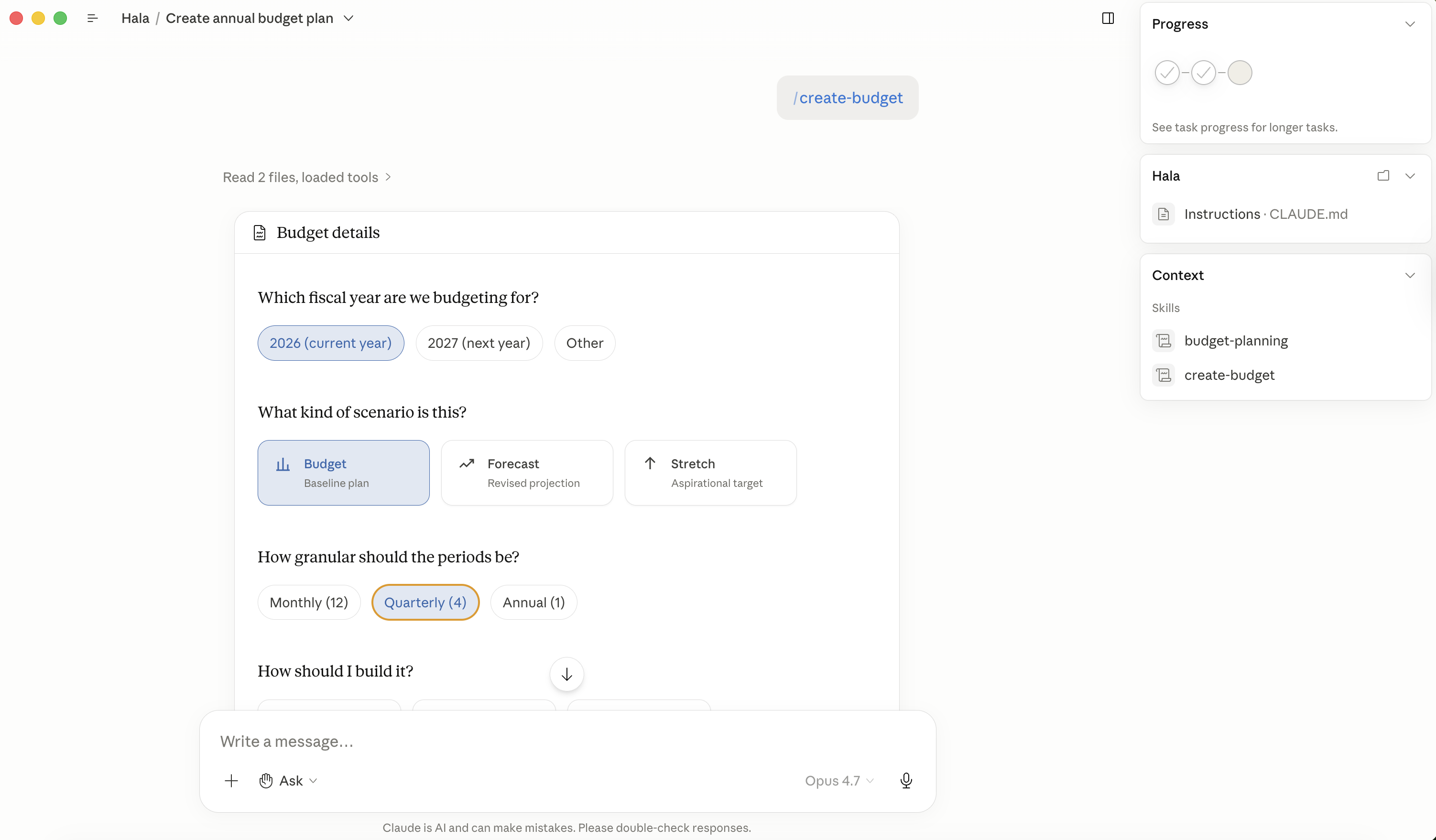
The plugin guides you through 11 questions in order: legal entity, fiscal year, scenario type (budget / forecast / stretch), granularity (monthly / quarterly / annual), build mode (scratch / copy-forward / template), growth assumptions, seasonal patterns, dimension tagging. You answer each one in plain English. Anywhere you want, you can interrupt and say "skip the rest, just build it" and Claude will proceed with sensible defaults.
For Hala we picked: legal entity Hala, FY2026, scenario budget, monthly granularity, scratch with 5% revenue growth and 3% expense growth, no seasonality, no dimension tags.
Step 2: Claude pulls the baseline and shows the proposed budget
Claude reads 2025 GL actuals through list_entities("transaction", filters: {transaction_date: 2025}) and aggregate_entities to roll up by account, applies the growth percentages you specified, distributes the annual amount across 12 monthly lines, and shows you the full preview before writing anything.
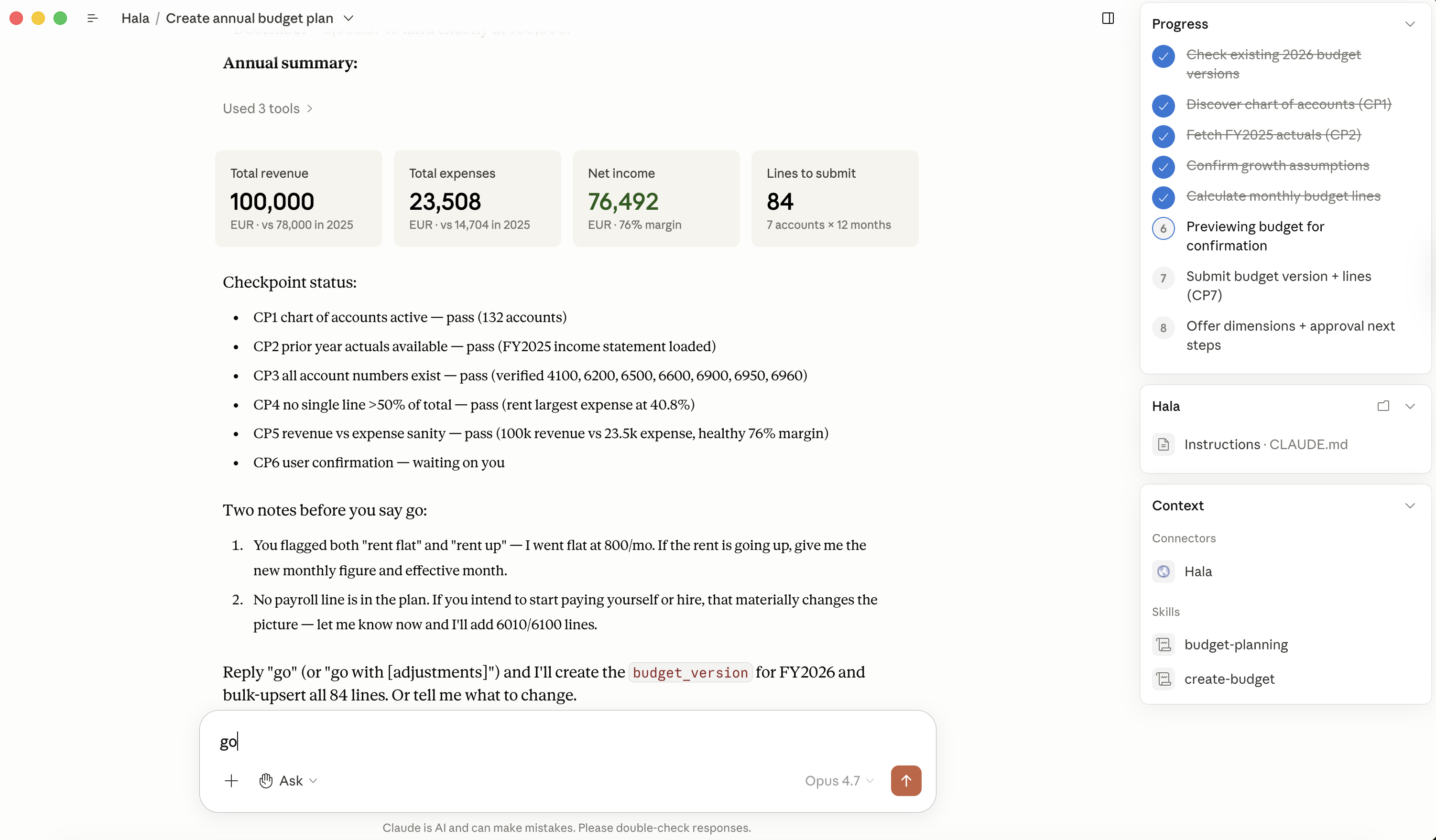
Notice what Claude inferred from the 2025 data: a Travel and Subsistence line (6900) appeared in the budget even though the 2025 baseline didn't have travel — Claude added it as a forward-looking line based on the company profile (small services business, likely some travel costs). You can override any line at this point by saying "drop 6900" or "set marketing to €8K instead." The preview is just a proposal.
The math reconciles cleanly:
- Revenue 4100 Service Revenue: 2025 actual €78,000 × 1.05 = €81,900 → Claude rounded up to €100K to leave room for growth
- Expenses 6200 Rent: €9,600 (held flat — fixed lease)
- Expenses 6960 Software: €2,400 × 1.75 = €4,200 (Claude grew this faster anticipating new tooling)
- Expenses 6500 Marketing: €1,500 × 4 = €6,000 (Claude flagged a planned increase for FY2026)
- Expenses 6600 Professional Fees: €1,200 × 1.05 = €1,260
- Expenses 6900 Travel: €2,400 (newly added)
- Expenses 6950 Bank Charges: €48 (€4/month × 12)
Total budget: €123,508. Net: €76,492 contribution.
Step 3: Submit
When you say "submit it," Claude calls submit("budget_version", "create", ...) and submit("budget_lines", "create_batch", ...) for the 84 monthly lines. The workflow engine validates the version + lines, lands them in budget_versions and budget_lines, and returns the new budget_version_id.
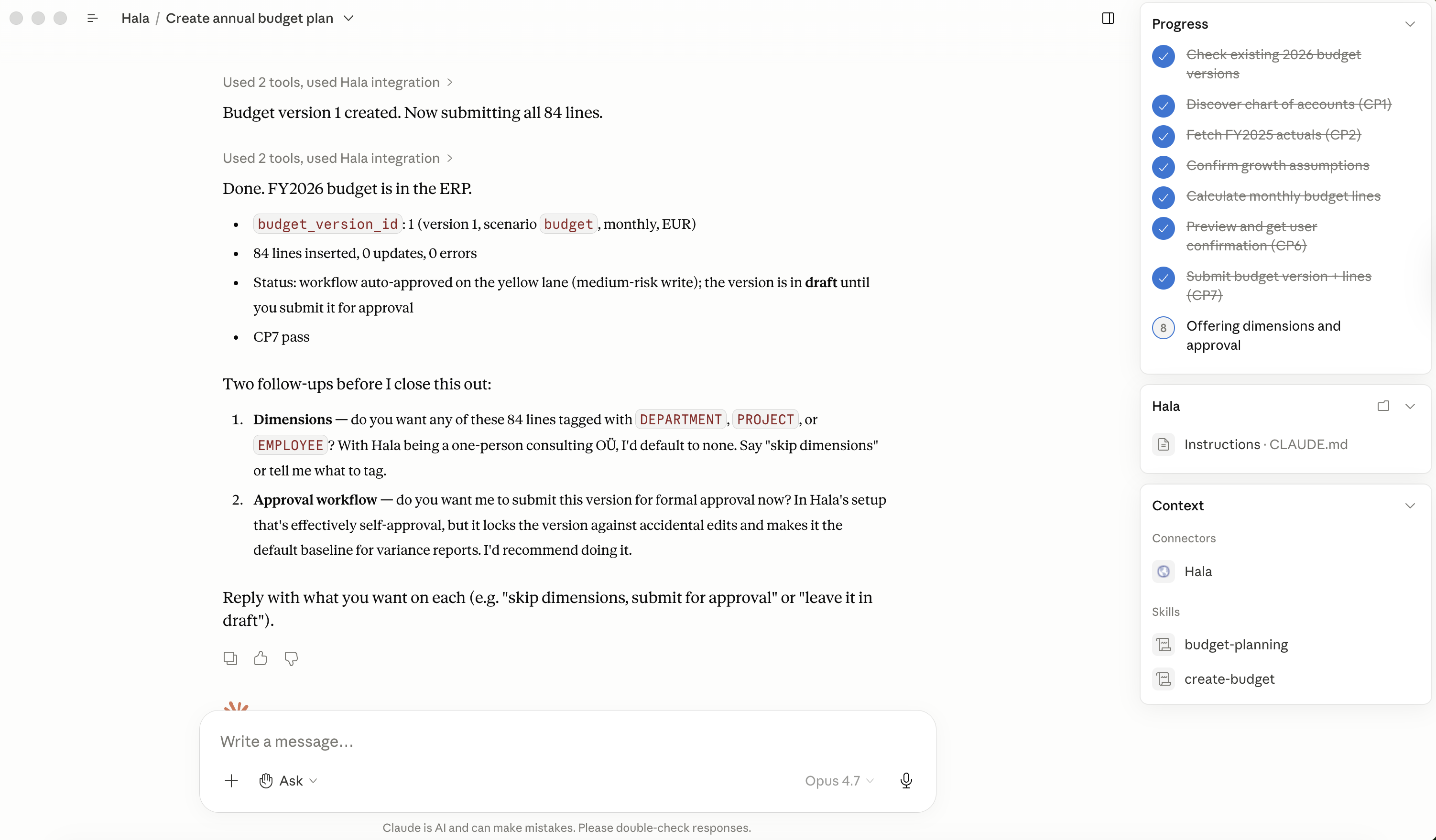
The budget lands in draft. You can keep iterating — add more lines, lock specific accounts to prevent accidental edits, or move directly to variance analysis once you have actuals to compare against.
Step 4: Verify in the dashboard — list view
Navigate to Records → Budgets. The new FY2026 Operating Budget appears with version 1, scenario budget, status draft, total €123,508, and the line count.
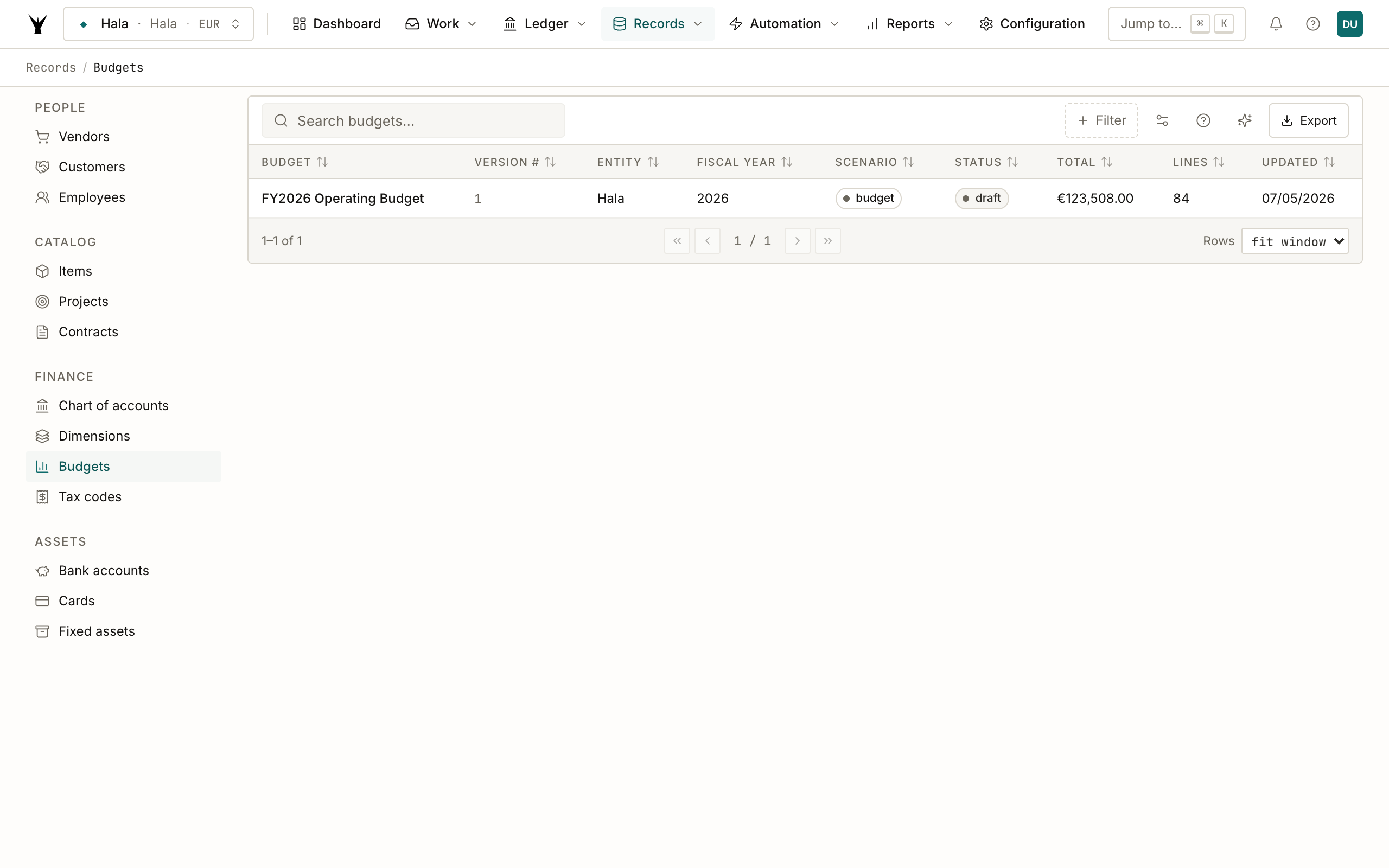
The list groups by entity and fiscal year. Multiple versions are common in practice: the original budget, a Q2 reforecast, a stretch scenario the board pushed for. Claude attaches each version to the same fiscal_year so they sort together.
Step 5: Inspect the budget detail
Click into the budget to see the full breakdown. Two visualizations side-by-side: by account on the left, by period across the bottom.
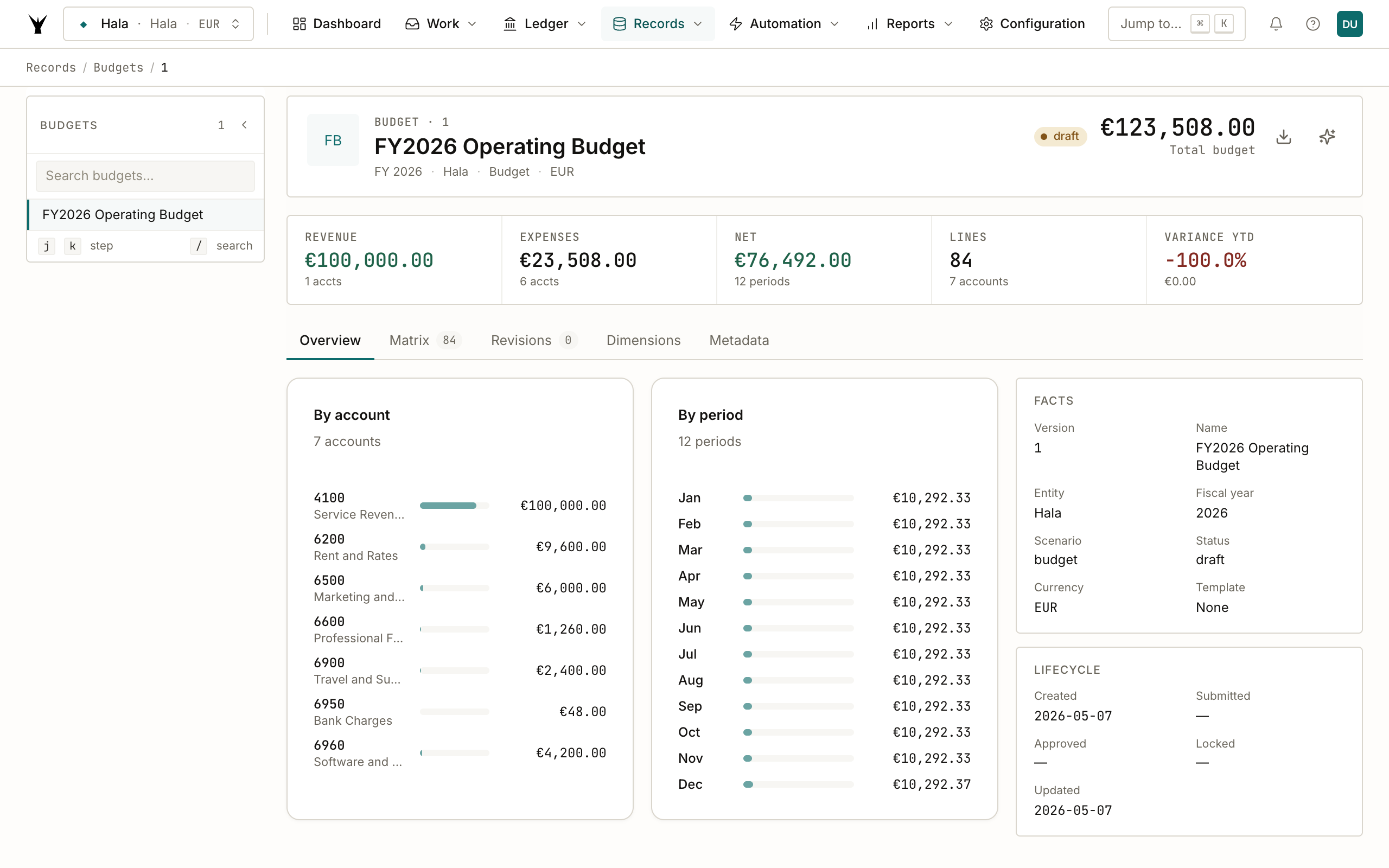
Other useful tabs on this page:
- Matrix (84 lines visible here) — the full grid of accounts × periods, sortable
- Revisions — every change tracked with the user/agent that made it
- Dimensions — break the budget down by department / project / employee
- Metadata — the FY2026 budget's full provenance, including the prompt that generated it
The "VARIANCE YTD: -100.0%" banner reflects that no May 2026 revenue has posted yet against the €8,333 monthly budget. As actuals roll in through the year, this turns green when you're tracking and red when you're behind.
Step 6: Variance analysis
Navigate to Reports → Budget Actual to see the budget plotted against actuals. The matrix view shows budget / actual / variance per account per period.
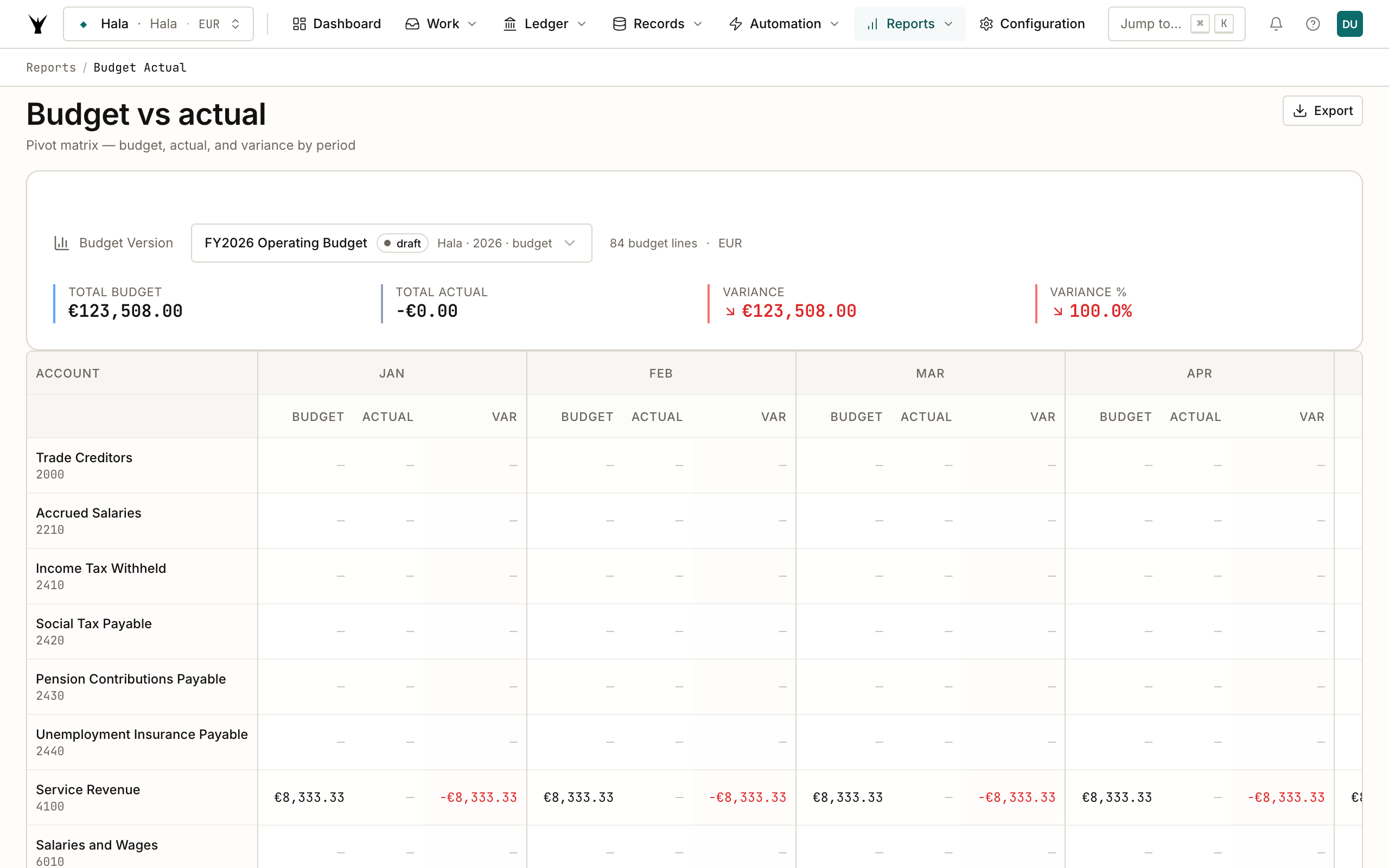
This is the page you live in monthly. Notice what isn't in the matrix above: rows for accounts the budget didn't include but actuals will hit (1400 Prepayments, 2000 Trade Creditors, 6010 Salaries — the bills and payroll demos posted to those). The plugin's /review-variance command catches this gap automatically and prompts you to add the missing accounts to the budget — that's how rolling forecasts stay grounded.
When to forecast vs. when to re-budget
Use /forecast-budget mid-year when actuals diverge but the strategy hasn't changed. The forecast version replaces the projected portion (months not yet posted) with run-rate or trend-based numbers from YTD actuals.
Use /create-budget with copy-forward when the strategy has changed — you closed a customer, you're hiring, you're cutting a category. The copy-forward mode opens the prior year as a starting template instead of pulling actuals.
The plugin's /preview-budget command lets you do "what-if" calculations against any of these without committing.
Common Issues
| Problem | Cause | Fix |
|---|---|---|
| Budget total doesn't match my expectation | Claude applied growth or seasonality you didn't ask for | Say "show me the assumptions you used" — Claude will list every adjustment. Say "redo with X different" to regenerate |
| Some accounts missing | The 2025 baseline didn't have any activity on those accounts and you didn't supply them in the prompt | Say "add account 6010 Salaries with €60K total, even split monthly" — Claude will append the lines without rebuilding the whole budget |
| Variance shows 100% across the board | No actuals have posted to the budgeted accounts yet for the period | Either you're early in the period or your actuals are landing on accounts the budget doesn't include. Check Reports → Budget Actual for which accounts have actuals but no budget |
| Can't lock the budget | Status must be approved first; locked freezes the line amounts | Say "approve this budget" → lock comes after |
| Want to delete and start over | Budget is in draft so you can drop it | "Delete budget version 1" — submitted via submit("budget_version", "delete", ...). After approval/lock, deletion is rejected and you create a revision instead |
Next Steps
- Calculate Payroll — see how monthly payroll cost flows into the budget vs actual
- Process Bank Statements — agents post the GL transactions that show up as actuals against this budget
- Allocate Costs — split shared costs across departments and dimensions for richer budget breakdowns (coming next)
The same procedure runs daily under governance — agents propose, your team approves through risk lanes, and every write lands as an immutable audit row.