How to Calculate Payroll
Run a full Estonian gross-to-net payroll from a single prompt — Claude does the math, posts to the GL, and prepares the SEPA payment batch.
- An Artifi account with the Hala connector enabled
- Active employees with compensation, tax settings, and tax-filing metadata
- Open payroll period for the month you're running
- Estonian tax jurisdiction rates seeded (income 22%, social 33%, unemployment 1.6/0.8%, basic exemption €700)
Estonian payroll is a maze: income tax (22%) on the right base, social tax (33%) on a regulated minimum, unemployment insurance split between employer and employee (0.8% / 1.6%), funded pension (II pillar) at 2/4/6% by employee election, the basic exemption (€700 in 2026), and special treatment for board fees that's different from regular wages. One mistake and you're either underpaying the employee, underpaying e-MTA, or both.
Artifi handles all of it from a single prompt. Claude reads your employees, their compensation and tax settings, validates the inputs through six checkpoints, calculates gross-to-net for every employee, and submits the run. From the same conversation you can approve the run, post the GL entry, and generate the SEPA payment batch — net pay to employees plus the three monthly disbursements to EMTA, Pensionikeskus, and Töötukassa.
This walkthrough shows a real May 2026 run for Hala Digital OÜ — three employees, total gross €8,500, total net €6,790.92.
What Claude calculates
For each employee, in order:
- Unemployment insurance (employee) — gross × 1.6%
- Funded pension II pillar — gross × pension_tier (2%, 4%, or 6%)
- Pre-tax voluntary deductions (e.g. III pillar pension, court orders)
- Taxable income — gross − unemployment_ee − pension − pre-tax deductions − basic exemption (€700)
- Income tax — taxable income × 22%
- Post-tax deductions
- Net pay — gross − all employee withholdings − all deductions
Then employer-side:
- Social tax — max(gross, €886) × 33%
- Unemployment insurance (employer) — gross × 0.8%
The €886 floor on social tax is Estonian-specific: even if you pay an employee less than that, the social tax base is the statutory minimum. Catches everyone who runs payroll in Excel.
Step 1: Forward the prompt
Open Claude.ai with the Hala connector enabled and ask Claude to calculate the run.
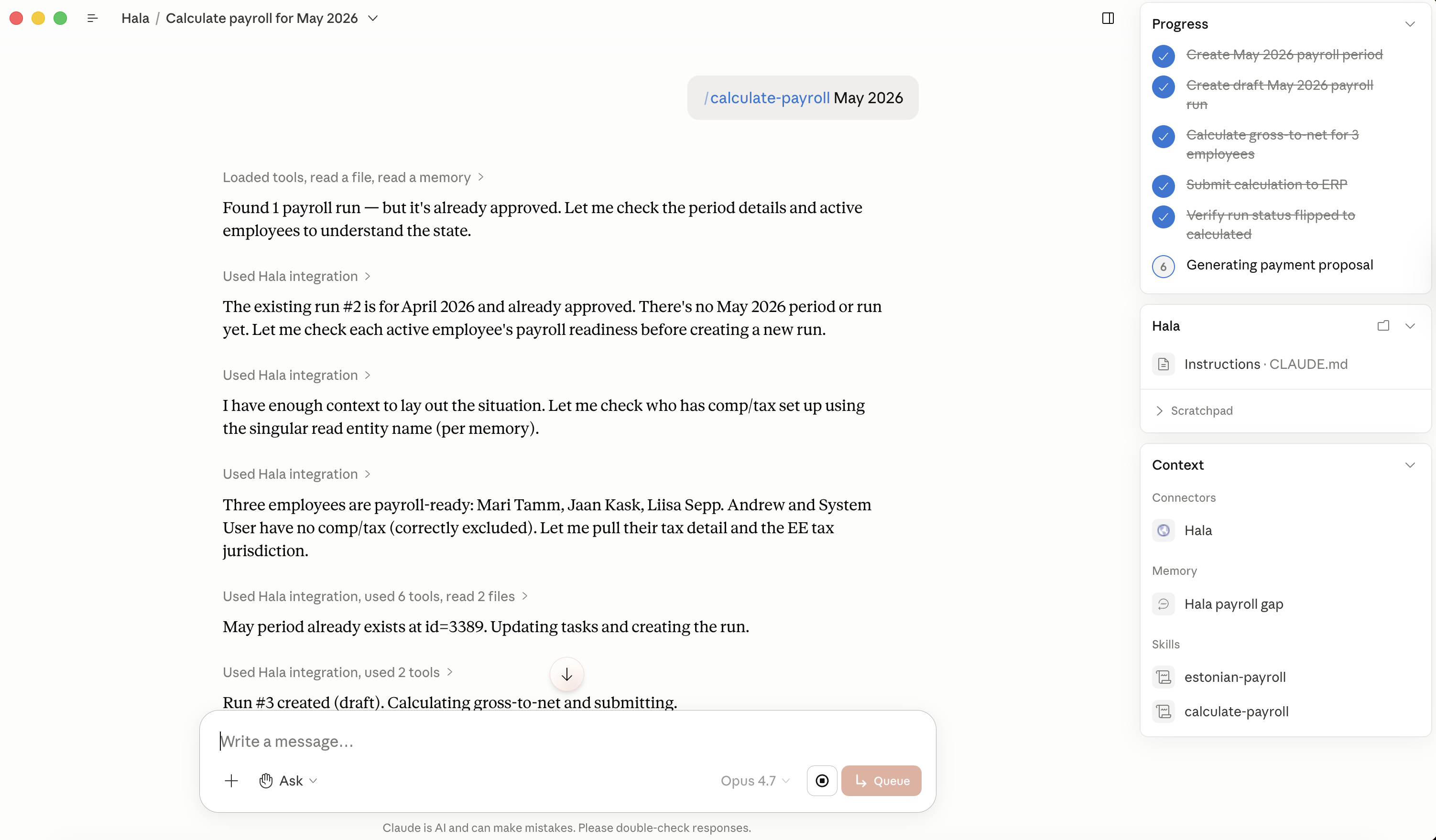
Claude reads the prerequisites — employees, compensation, tax settings, payroll period, jurisdiction rates — runs six pre-flight checkpoints (CP1: run is in draft, CP2: every employee has active compensation, CP3: every employee has tax settings, CP4: tax rates are loaded, CP5: net-pay formula reconciles to ±€0.02, CP6: backend validation passes), and then submits the calculation. No human-in-the-loop math.
Step 2: Claude submits and Hala approves
The lane is yellow (yellow lane) — single approval — and Claude can request that approval in the same conversation. Once approved, the run moves to posted and the GL entry lands.
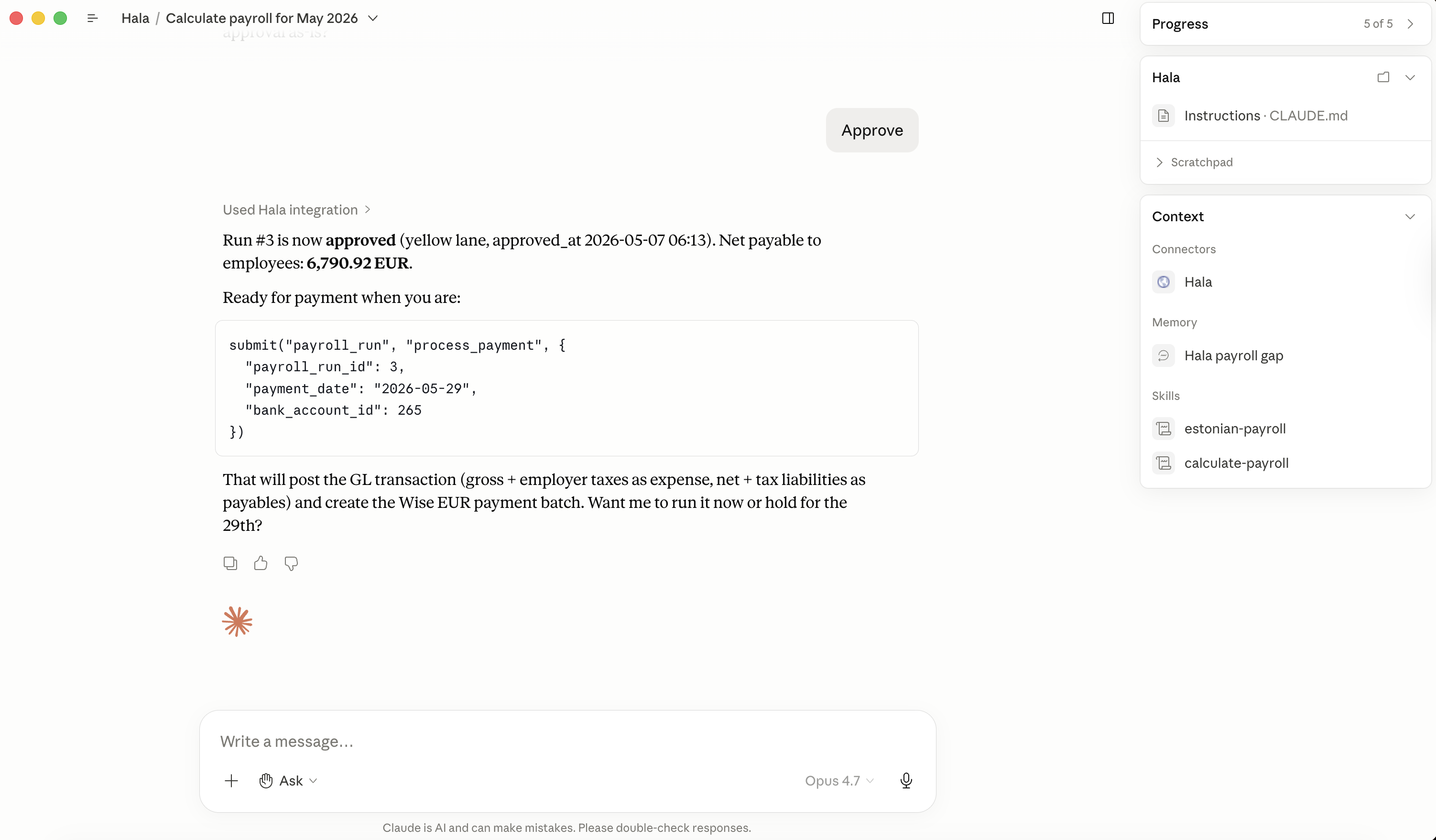
The math reconciles: gross €8,500 across three employees, employee withholdings (income tax + unemployment + pension) total €1,709, net payable to employees €6,790.92, employer taxes (social + unemployment) €2,873. Hala's total cash impact for May payroll is €11,373.
Total runtime end-to-end: ~30 seconds.
Step 3: Generate the payment proposal
Claude offers to prepare the SEPA payment batch — six lines splitting the €11,373 between employees (3 net pay transfers) and tax authorities (EMTA, Pensionikeskus, Töötukassa).
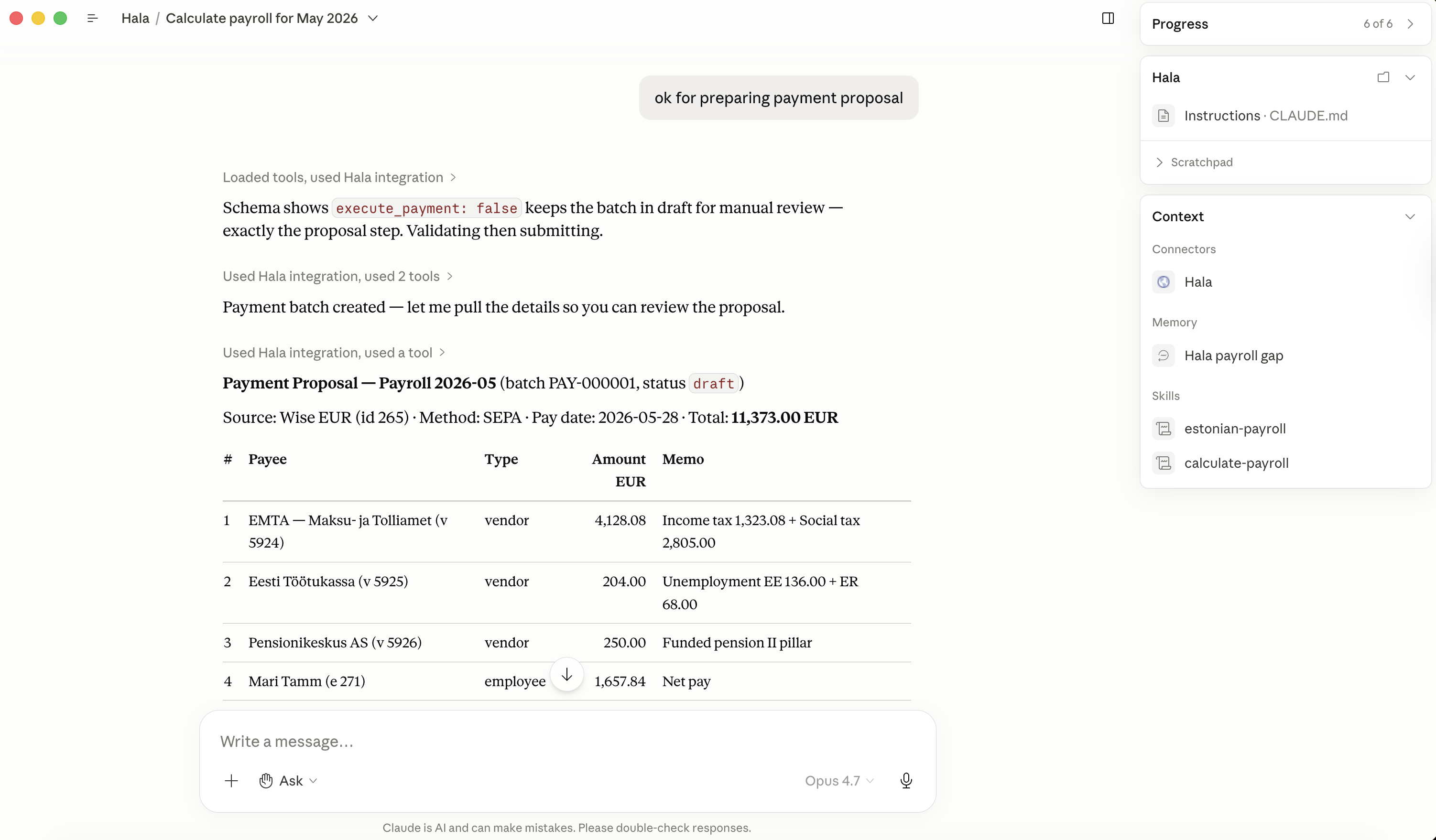
The batch is created in draft status — nothing leaves the bank account yet. Approval and transmission happen explicitly in the dashboard, not from the conversation.
Step 4: Find the run in the dashboard
Navigate to Runs → Payroll. Both runs (April 2026 already approved earlier, and the new May 2026) appear with their status, employee count, gross/net totals, and the linked posted GL transaction.
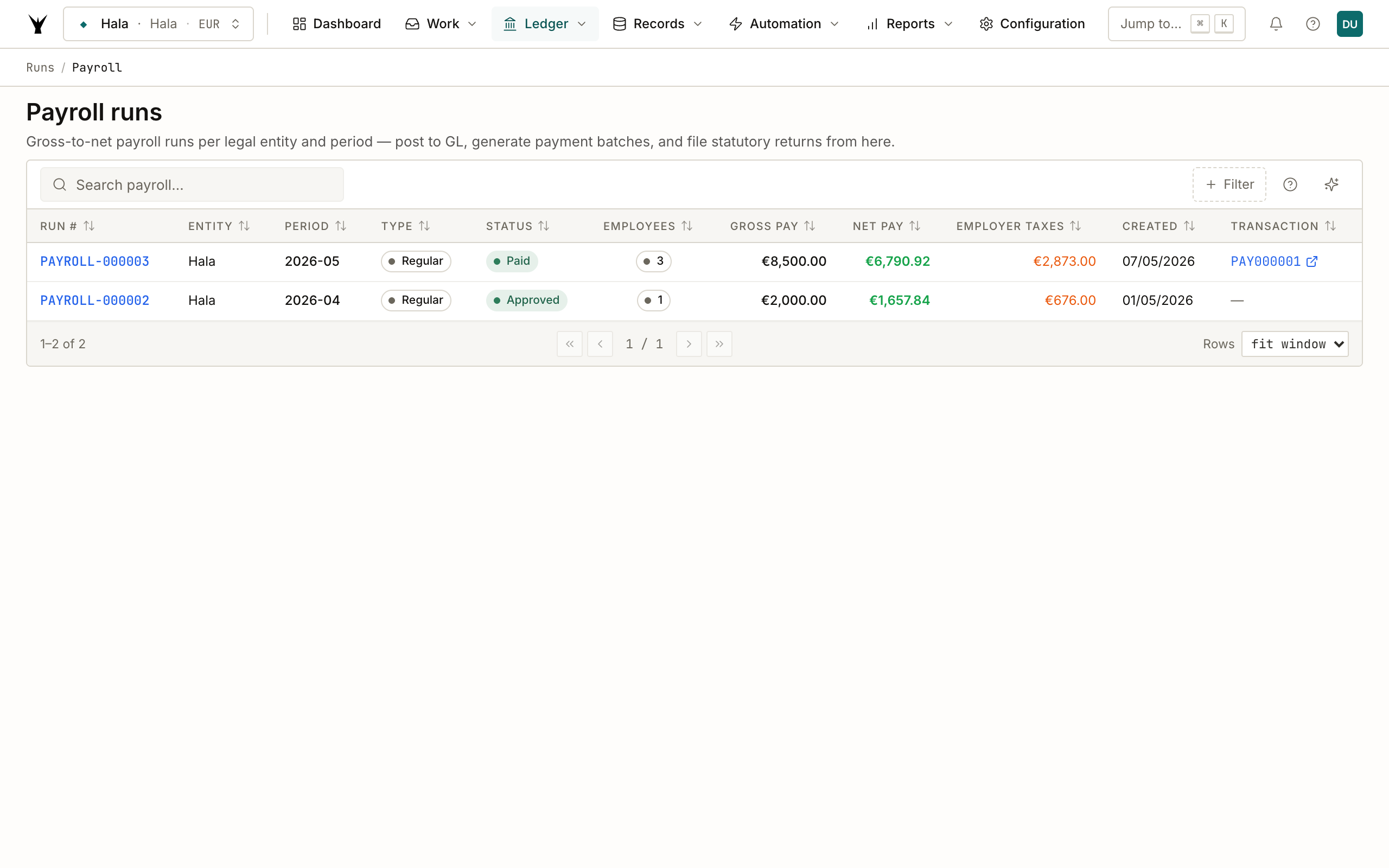
Click PAYROLL-000003 to open the detail.
Step 5: Per-employee breakdown
The detail page shows every employee with their full tax and deduction breakdown — 27 lines across three employees, grouped by line type (gross_pay, income_tax, net_pay, pension, social_tax, unemployment_employee, unemployment_employer).
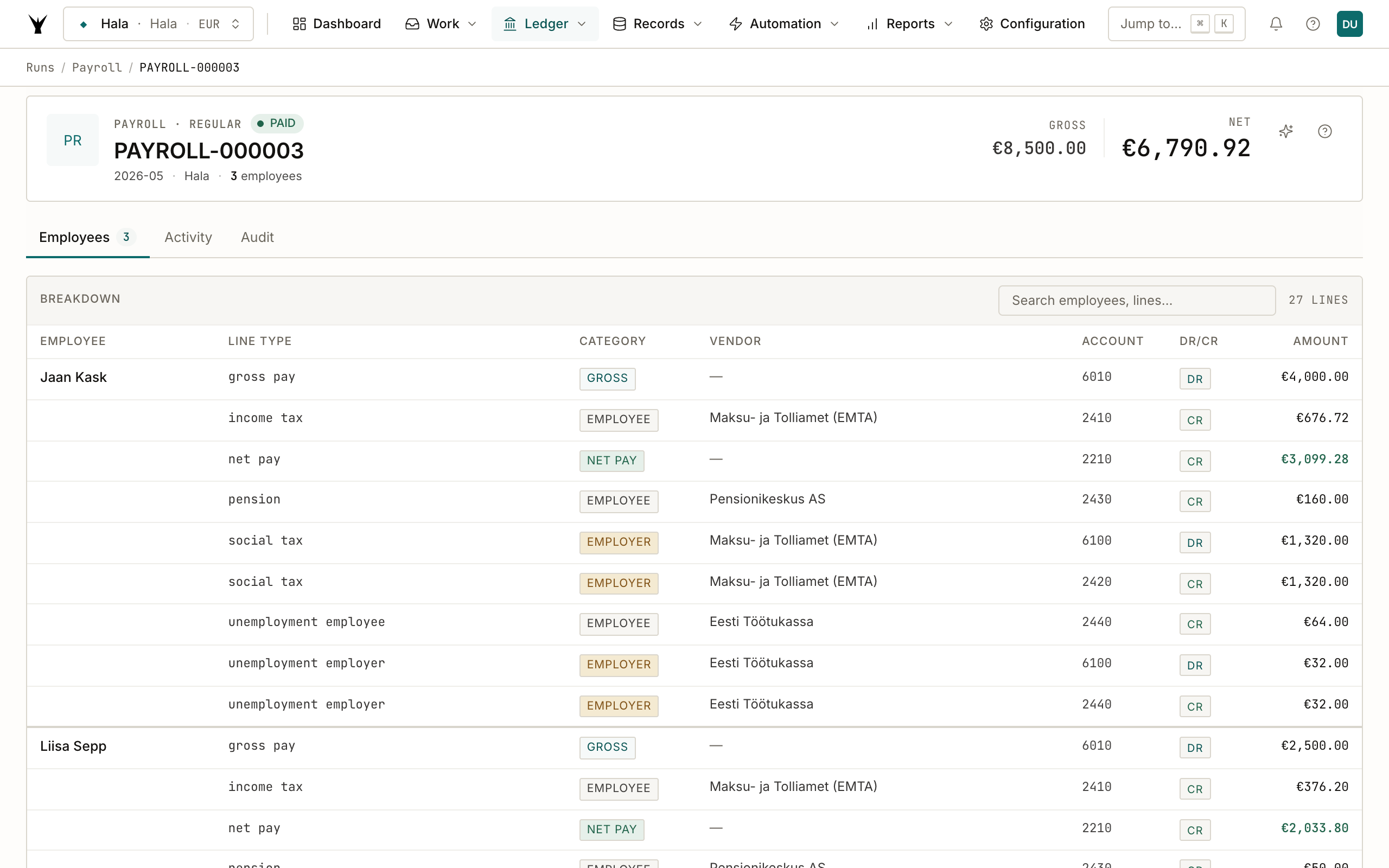
Each tax line is wired to the right counterparty already: income tax credits go to EMTA, pension to Pensionikeskus AS, unemployment to Eesti Töötukassa. The lines you need to pay each tax authority once a month are right there in the detail — no separate spreadsheet.
Step 6: Posted GL entry
The run posts a single payroll journal entry. Open it from the Transaction column on the runs list (PAY000001).
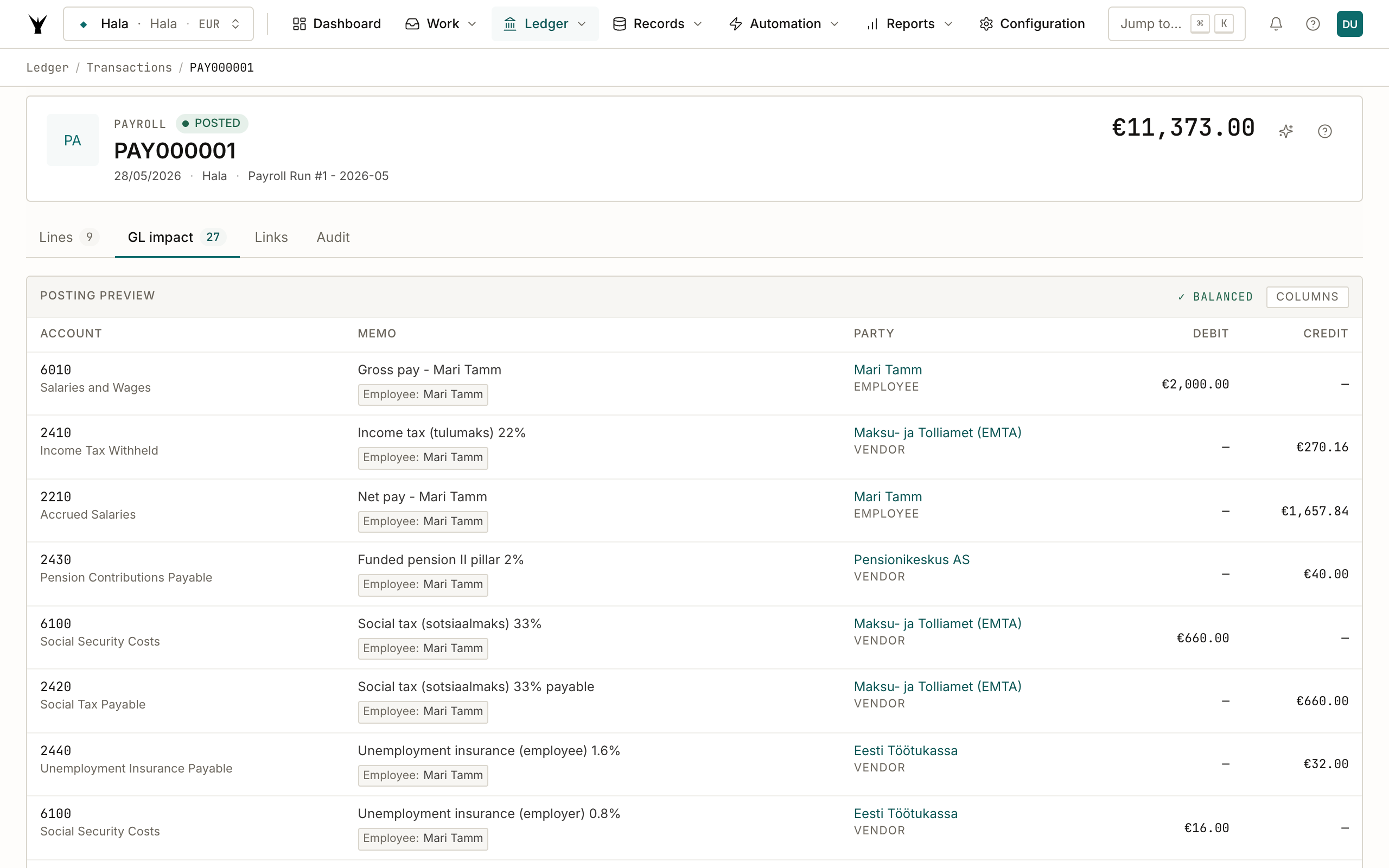
Total €11,373 debit / €11,373 credit, balanced. The postings correctly split:
- Gross pay as expense (DR 6010 Salaries and Wages)
- Net pay as accrued liability (CR 2210 Accrued Salaries) — paid out via the SEPA batch
- Employee withholdings (income tax, unemployment, pension) as separate liabilities (CR 2410, 2440, 2430)
- Employer taxes as both expense (DR 6100 Social Security Costs) and matching liability (CR 2420, 2440 payable) — the offsetting pair captures that you owe these to e-MTA but the cost lands on your P&L
This double posting for employer taxes is what most people get wrong in Excel — the social tax has to hit your P&L the same period as the wages, but it's also a payable you'll settle later. Two-sided entry handles both.
Step 7: Payment proposal in the dashboard
Navigate to Runs → Payment Proposals to find the SEPA batch Claude created.
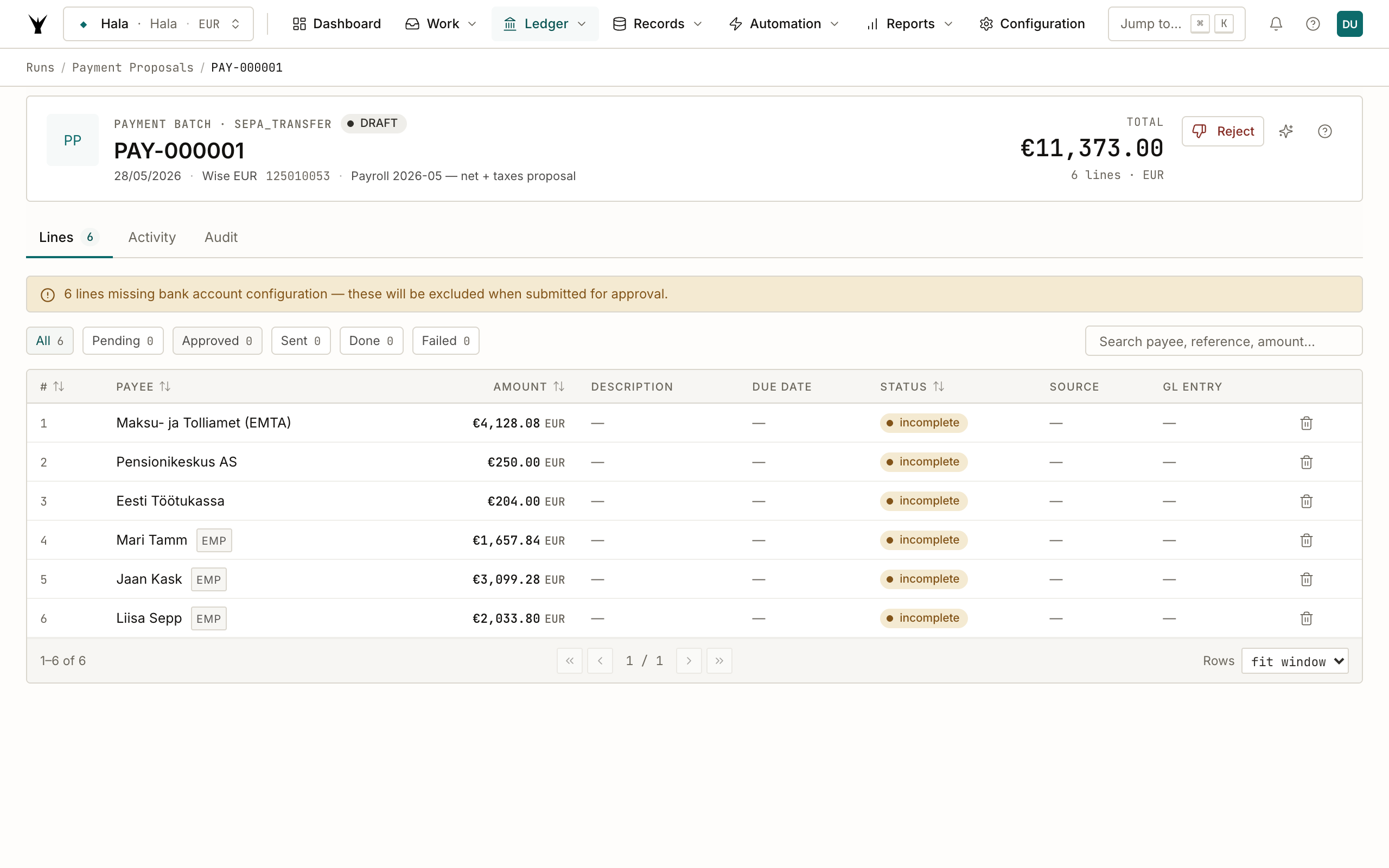
The batch is draft — no money has moved. The yellow banner ("6 lines missing bank account configuration") is real life: in this demo Hala hasn't filled in IBANs for every employee/vendor yet, so those lines are flagged. Once you fill them in (or set them up for real employees), the batch moves to pending_approval → approved → transmitted and the actual SEPA payment file is generated.
Step 8: Audit trail
The Audit tab on the run page shows the full provenance — who calculated it, when each transition happened, and which user/agent took each action.
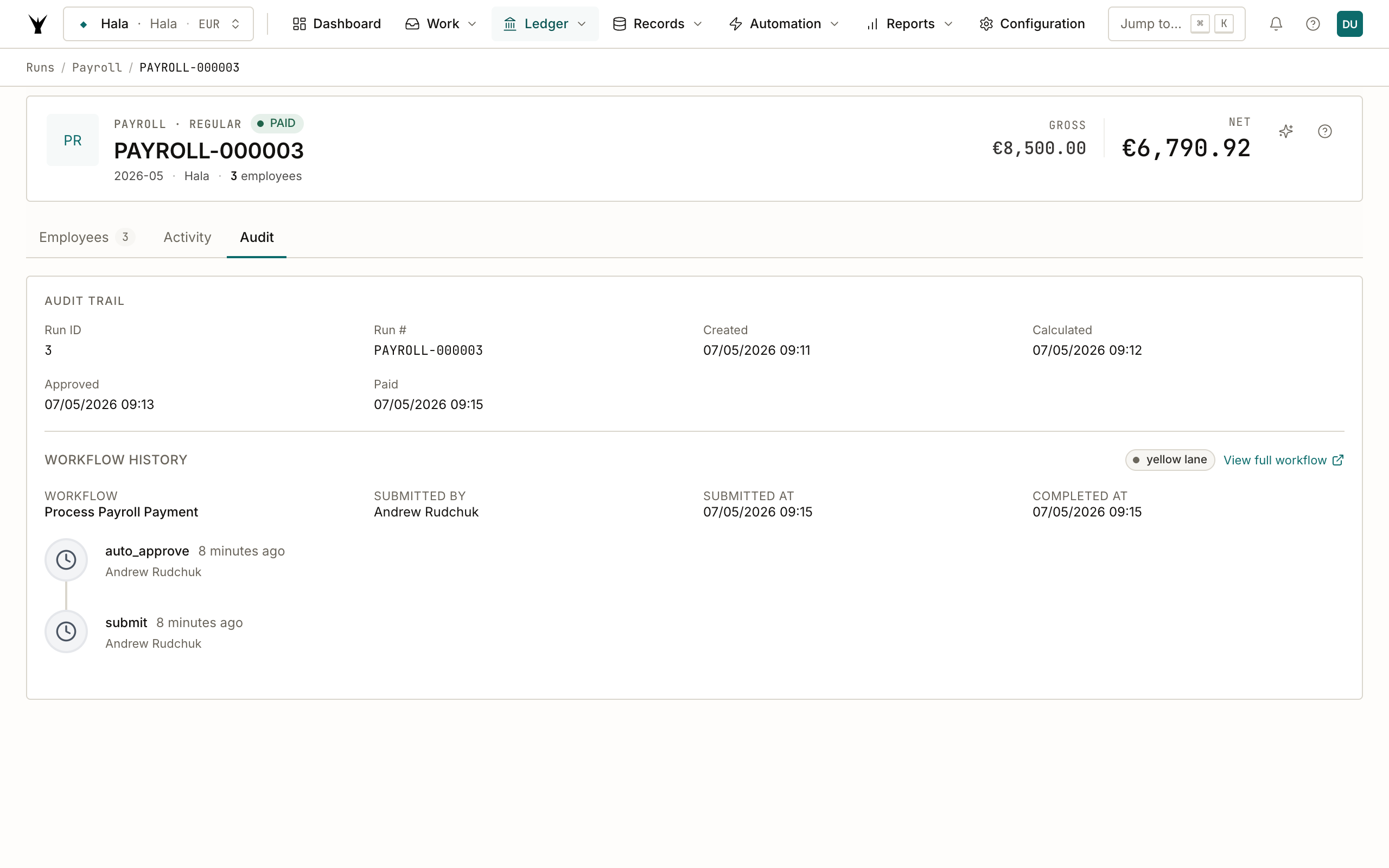
This is what gets exported when your accountant or auditor asks "show me the trail for the May 2026 payroll." Click any node to drill into the underlying workflow instance.
What about the TSD declaration?
The Estonian Tax and Customs Board requires a monthly TSD (declaration of withheld income and social taxes) filed via e-MTA by the 10th of the following month. The same payroll plugin can generate the XML for you:
You: Generate the TSD declaration XML for run 3
Claude: [reads the run details, builds Annex 1 with the c1020_ValiKood codes
         (10 for salary_wage, 21 for board_fee), totals Annex 1 + employer-tax
         section, returns the file ready to upload to e-MTA]
The plugin doesn't auto-file with e-MTA — you upload it yourself in the e-MTA portal. We could build the auto-filing later, but right now the trade-off is clarity-of-control: you see the XML before it lands on the tax authority's side.
Common Issues
| Problem | Cause | Fix |
|---|---|---|
| "CP2 failed: employee X has no active compensation" | Employee row exists but no employee_compensation with is_active=true for the period | Add the comp row in Records → Employees → [Employee] → Compensation tab before re-running |
| "CP3 failed: employee X has no tax settings" | Employee row exists but no employee_tax_settings (pension tier, basic exemption, residency) | Same — add via the Employees record |
| Net pay off by €0.01–0.02 | Rounding sequence between unemployment, pension, and income tax — Estonia uses round-half-up at 2 decimals | Claude applies the official rounding order; if you see ±0.02 drift it's CP5 working as intended (it would block submission for larger drift) |
| Social tax higher than 33% × gross | Employee's gross is below the €886 statutory minimum base — social tax was applied to €886 instead | This is correct behavior — under-minimum salaries still owe social tax on the floor |
| Board fees taxed differently from salary | Board members use payment_classification_slug = "board_fee" which gets c1020_ValiKood "21" on the TSD instead of "10" | This is correct. Verify the slug on the employee's compensation record matches their actual relationship to the company (employment vs. board mandate) |
| Pension tier 4% or 6% not applied | Employee enrolled in II pillar before 2026 increase but tax_settings still shows 2% | Edit the tax_settings row to the new tier; the next run will pick it up |
Next Steps
- Generate Tax Declarations — build the TSD XML for e-MTA filing (coming soon)
- Plan a Budget — build the FY budget that the payroll runs roll up into
- Process Bank Statements — see how the SEPA payment file flows back from the bank to close the loop on the payment proposal
The same procedure runs daily under governance — agents propose, your team approves through risk lanes, and every write lands as an immutable audit row.