How to Allocate Costs
Split shared costs across departments, projects, or any dimension with a single slash command — Claude reads the source GL balance, applies your split rule, and posts a balanced allocation journal entry.
- An Artifi account with the cost-allocation plugin enabled
- Active dimensions configured (e.g., department, cost_center, project) with at least 2 values
- A source account with a real GL balance to allocate, or a posted bill/invoice/JE to allocate from
Most shared costs live on a single GL account because the original transaction was a single line: rent for the whole office, an enterprise SaaS subscription used by everyone, the auditor's bill. For management reporting, those costs need to be split across the people, departments, or projects that actually consumed them — otherwise your "Engineering opex" report shows €0 for rent and the CFO has to do the math in her head every quarter.
The cost-allocation plugin is the slash-command answer. Tell Claude what to allocate, what to split it across, and the rule. Claude reads the GL, calculates the splits, validates that nothing's already been allocated, and submits a balanced journal entry tagged with the right dimension values.
This walkthrough allocates Hala's 2025 software & subscriptions cost (€2,400 in account 6960) evenly across three departments — Engineering, Marketing, and G&A — so management sees €800 of SaaS cost on each department's P&L instead of €2,400 floating on a shared overhead line.
Two allocation modes
The plugin supports two distinct flows:
- Standalone (from GL balances) — pull the full balance of a source account for a period, split it. Used here.
- Document-linked (from a specific bill/invoice/JE) — pick a single source transaction and split that one across dimensions. Better when you want full traceability ("this Anthropic bill went 60% to Engineering, 40% to Customer Success").
Both modes generate the same shape of output: a balanced allocation journal entry with the source line credited and the target lines debited, each tagged with the appropriate dimension value.
This how-to uses standalone. Document-linked is the same flow with a different "what to allocate" answer.
Step 1: Run the slash command with your intent
Open Claude.ai with the Hala connector and type /run-allocation along with a one-line description of what you want.
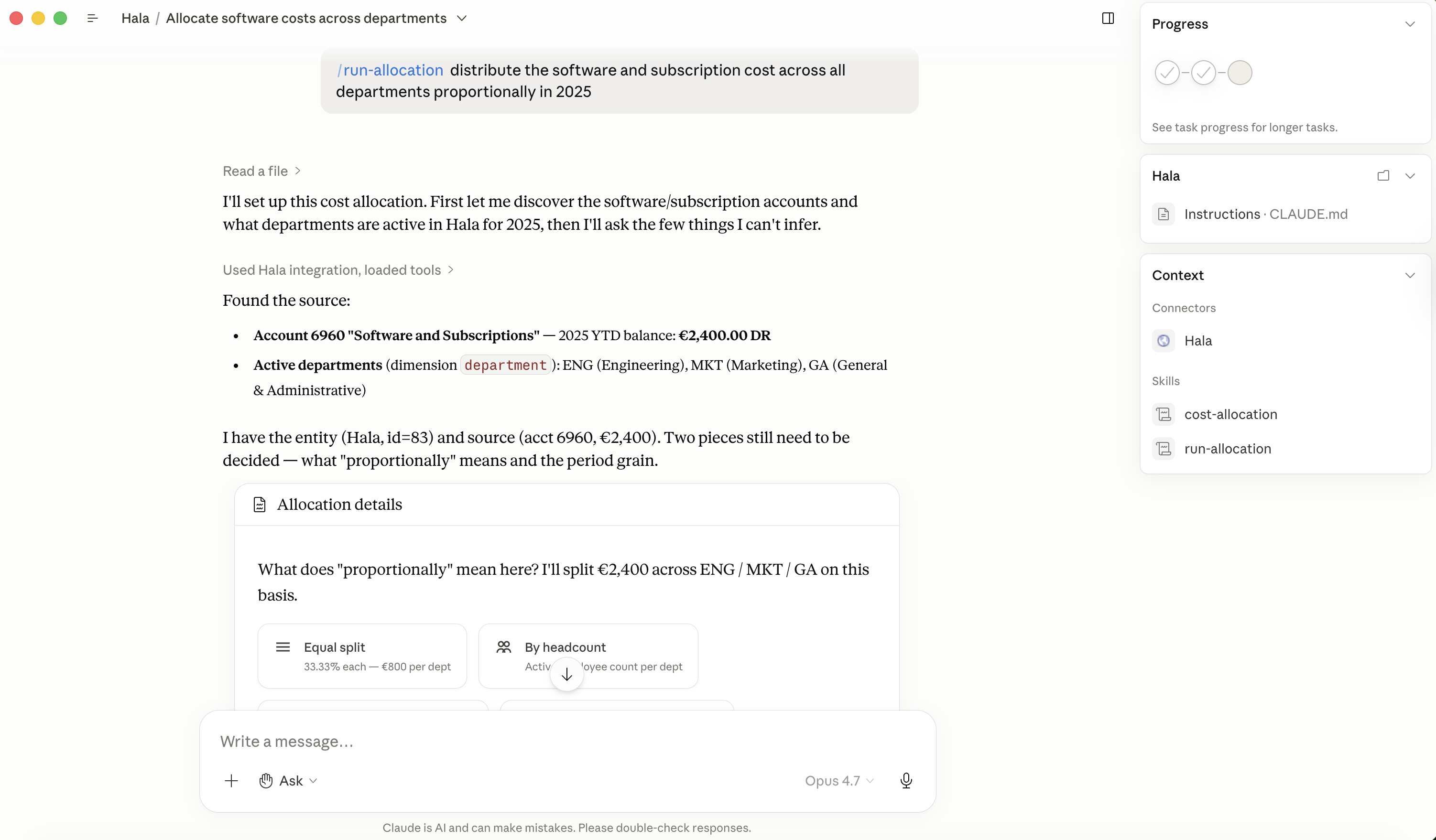
The slash command alone works (Claude will ask 9 step-by-step questions), but pairing it with a sentence of intent skips most of the back-and-forth. Claude infers: legal entity Hala (from the connector), allocation mode (standalone, since you mentioned account 6960), the source account, the target dimension (department), and the splitting method (equal). It asks just enough follow-up to confirm before moving forward.
Step 2: Claude calculates and previews
Claude reads the 2025 balance for account 6960 via aggregate_entities, looks up the active values of your department dimension, applies the equal split, and shows the proposed allocation lines.
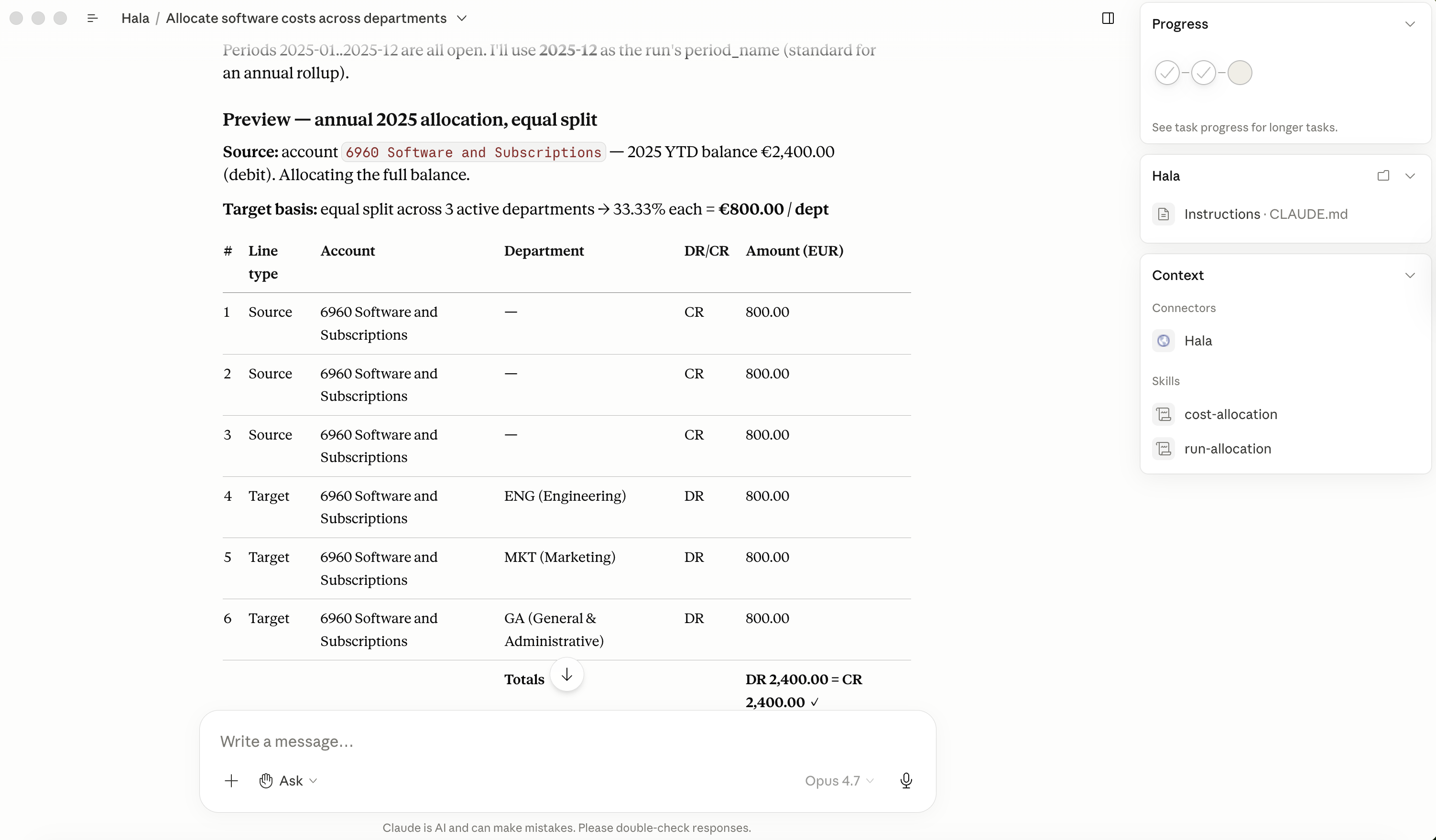
Three things worth checking on the preview:
- Balanced — total DR equals total CR. The plugin will refuse to submit an unbalanced allocation.
- Source account = target accounts — you're not changing where the cost lives in the chart; you're adding dimension tags to the same account so reports group it by department. Allocations that change the account are also possible (for inter-company recharges, for example) but require explicit override.
- Source already allocated? — if you ran an allocation against this account/period before, Claude refuses to double-allocate. The check looks at posted ALLOC runs touching the same source account in the same period and flags them. You'd see this as a warning at the preview stage.
Step 3: Submit and post
When you say "looks good, submit and approve," Claude creates the allocation_run row, submits the lines through the workflow engine, and posts the underlying journal entry. The whole sequence takes about three seconds.
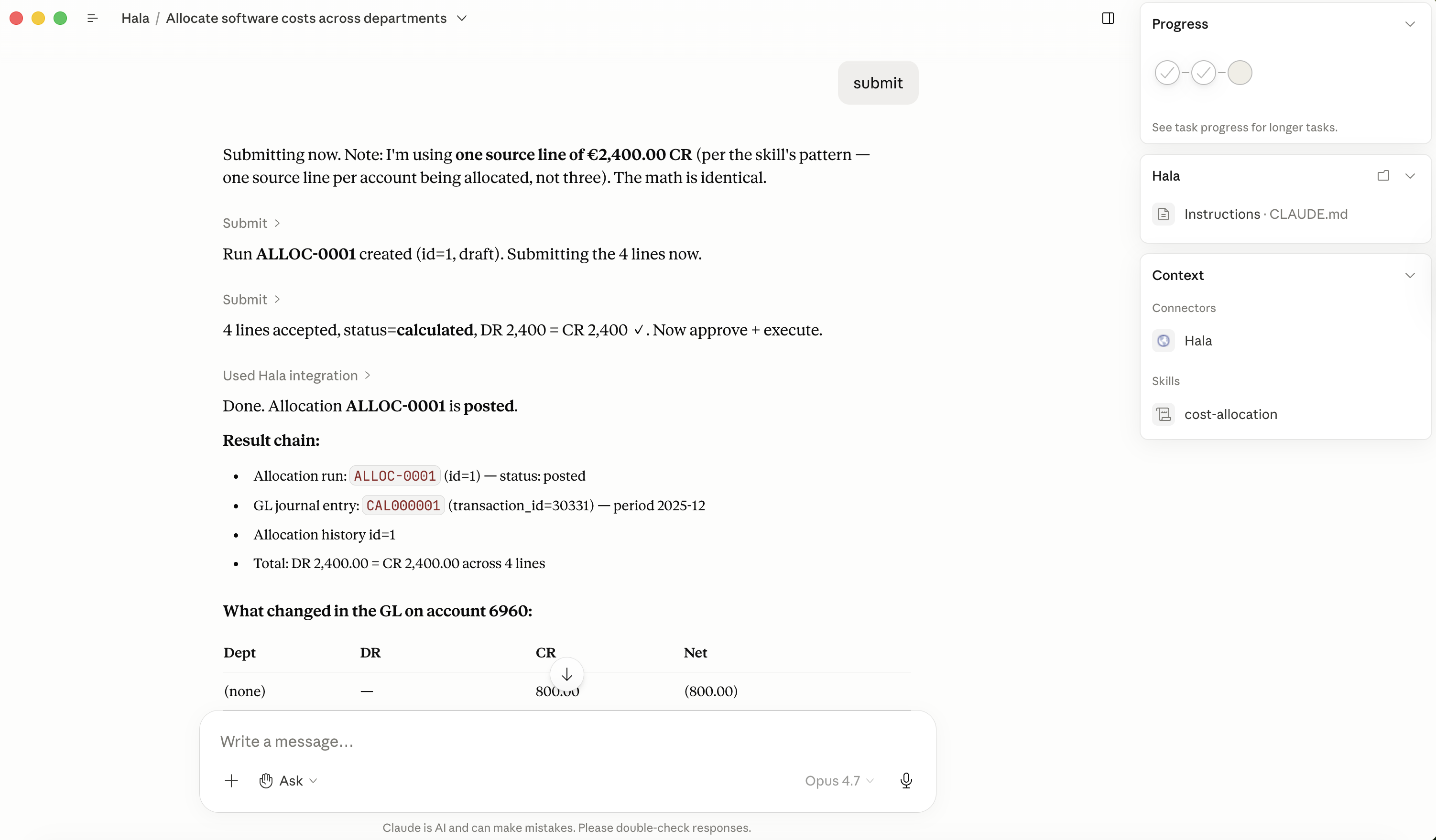
Two artifacts now exist in the system:
allocation_runs.id=1— the allocation metadata (source, rule, status, dimension splits)transactionsrow — the posted journal entry with the actual GL impact (CAL000001 in Hala's case)
The two are linked via allocation_runs.transaction_id. The journal entry shows up in standard ledger reports; the allocation_run shows up under Runs → Allocations with extra context (the rule, the source plugin, who triggered it).
Step 4: Verify in the dashboard — list view
Navigate to Runs → Allocations. The new ALLOC-0001 appears with its run number, period, type (Cost Allocation), status Posted, line count, total amount, and a clickable target column linking to the underlying journal entry.
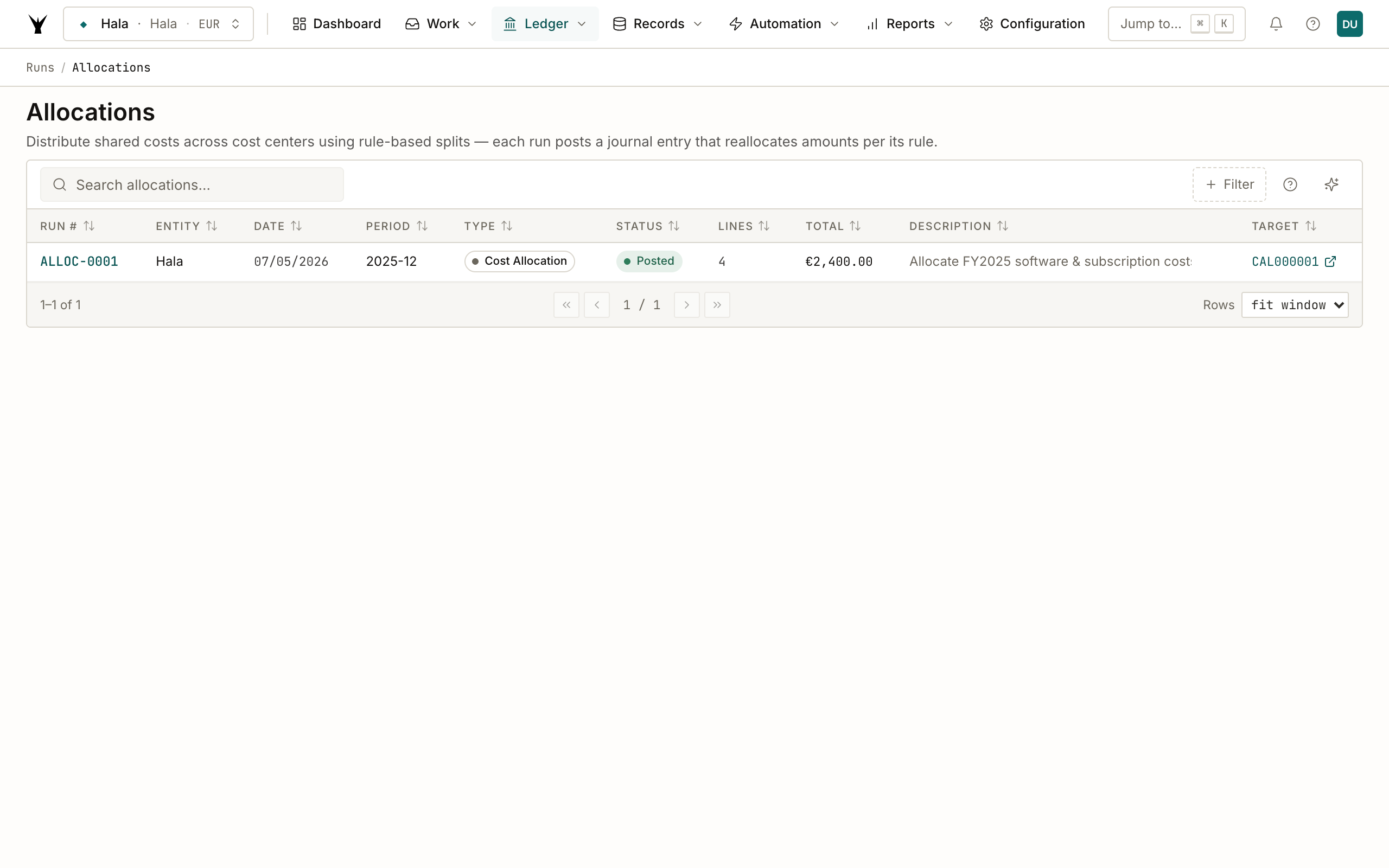
The list groups allocation runs separately from regular journal entries. This makes it easy to see all allocations posted in a given period (typically end-of-month) without combing through the full GL.
Step 5: Inspect the allocation detail
Click the run to see all 4 lines side-by-side: 1 source (CR), 3 targets (DR), totals balanced.
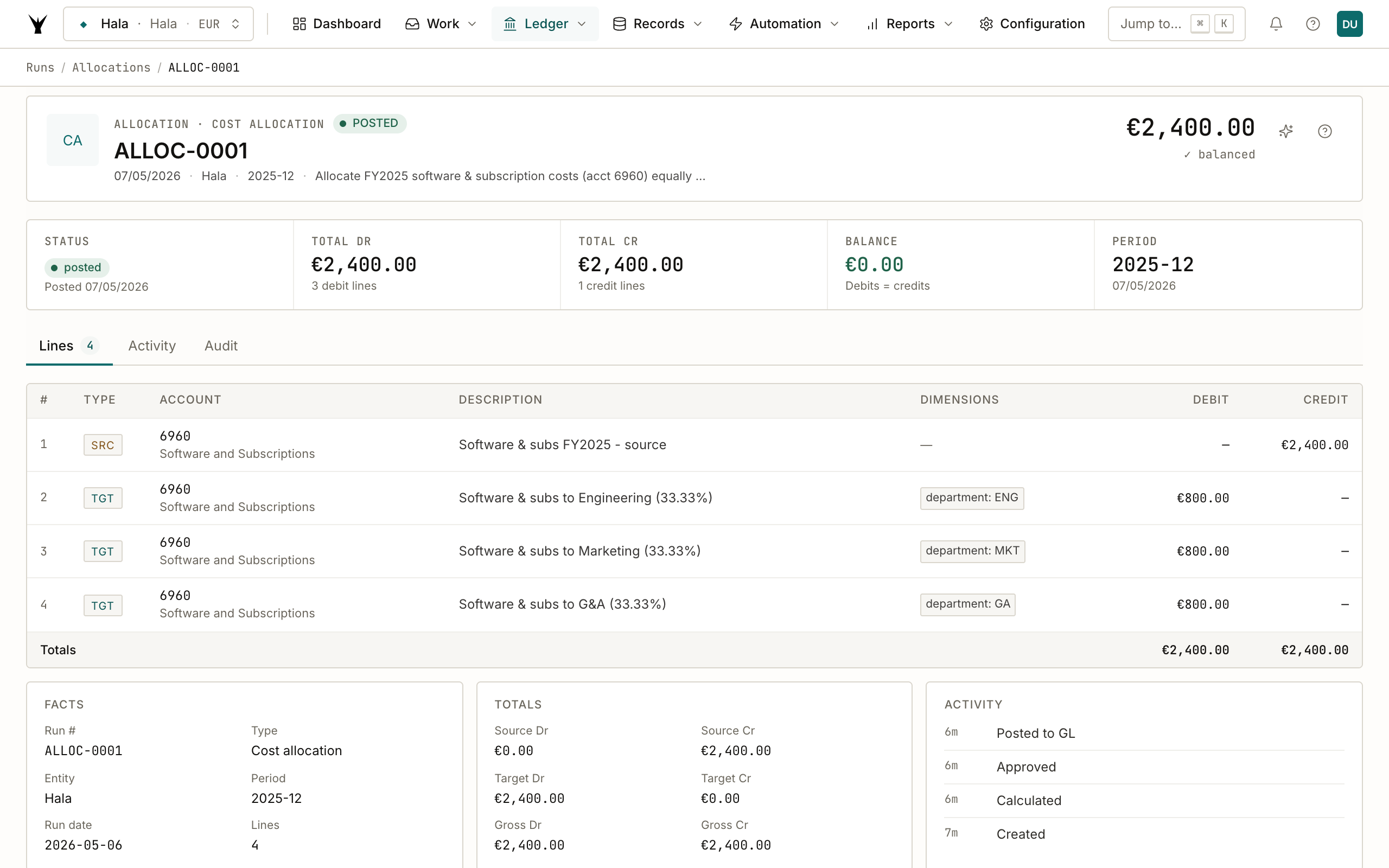
Each target line carries the department dimension value as a tagged column — that's what makes management reports filterable. When the CFO opens the P&L by department, the €800 Software cost shows on Engineering, the €800 on Marketing, and the €800 on G&A, instead of a single €2,400 line on a shared "Operations" cost center.
The Activity panel on the right shows the run's lifecycle: created → calculated → approved → posted to GL. Each transition is timestamped.
Step 6: The underlying journal entry
Click the linked transaction to see the actual GL posting. This is the journal entry that lands in your trial balance and on every report — the allocation_run is the metadata; this JE is the accounting reality.
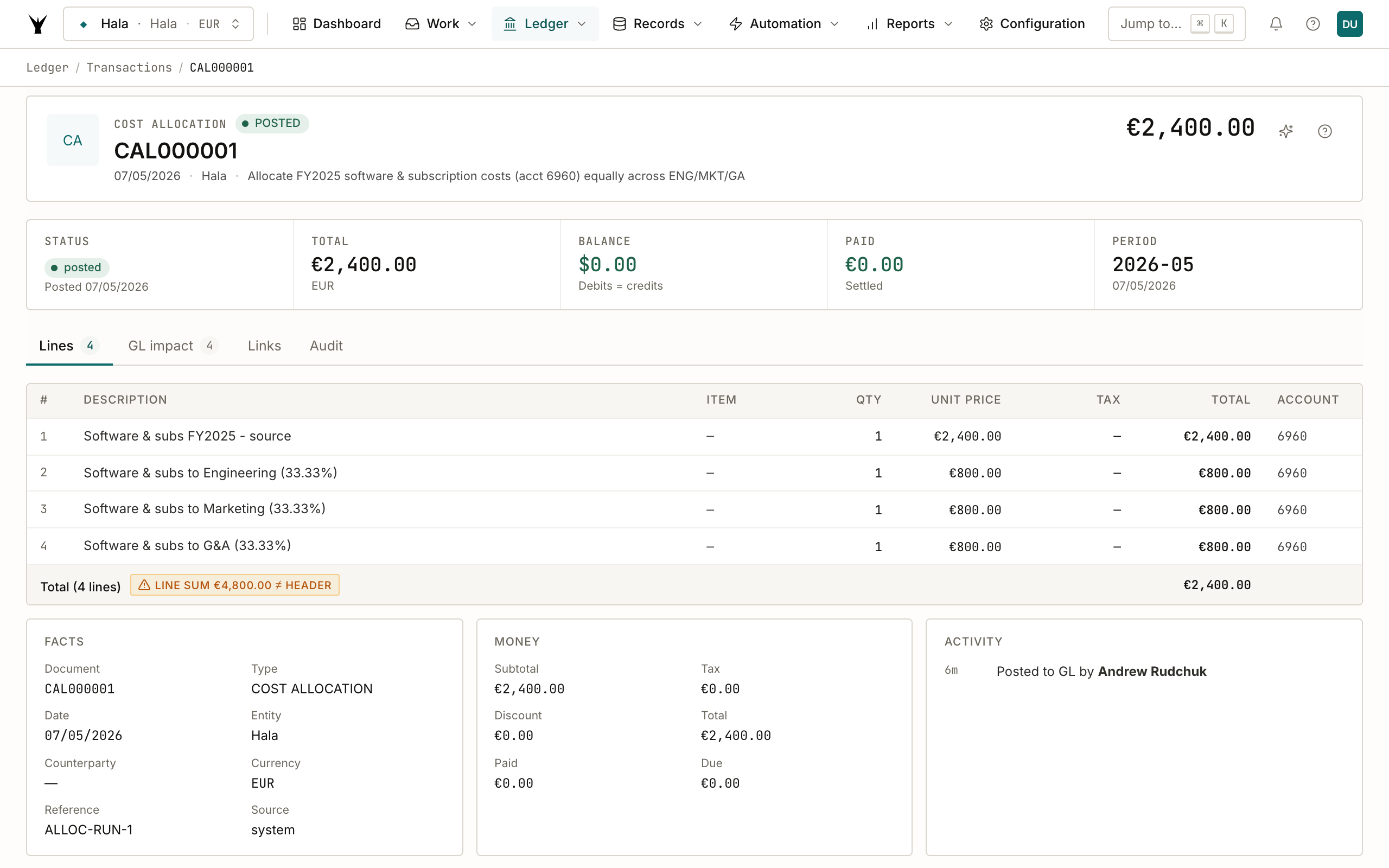
Notice the warning chip: "LINE SUM €4,800.00 ≠ HEADER" — that's the dashboard noticing the line totals (1 source DR + 3 targets DR + 1 source CR + 3 targets CR = €9,600 of activity / 2 sides = €4,800 absolute) appear to disagree with the header amount (€2,400). This is by design for allocation entries — the header amount represents the net allocated cost, not the gross movement. Worth knowing the chip exists so you don't chase it as a bug.
When to allocate standalone vs document-linked
Standalone — best for periodic, predictable splits. Monthly rent, quarterly software, annual insurance. The source is a known account balance, the rule is a known split (equal, headcount-weighted, revenue-weighted, or custom %).
Document-linked — best when a specific bill or invoice has a known consumption pattern that doesn't match the company-wide split. The Anthropic bill is 70% Engineering this month because of a specific R&D project; the Acme audit fee is 100% G&A; the customer rebate from Bolt is 100% the consulting line of business.
Both flows produce the same kind of allocation_run, so reports treat them identically. The choice is just about which input feels more natural for the cost in question.
Common Issues
| Problem | Cause | Fix |
|---|---|---|
| "Source account has no balance for the period" | Account was empty in the chosen period | Check the period boundary (FY2025 vs FY2026) — common when allocating December costs into January |
| "Source already allocated for this period" | A prior ALLOC run already split this account/period combination | Don't double-allocate. Either reverse the prior run first or pick a different period |
| Dimension column shows blank on target lines | The dimension type isn't applies_to: ['transaction_line'] | Update the dimension's applies_to array to include transaction_line so it can tag at the line level |
| Splits don't sum to source amount | Custom % don't add up to 100% | Claude refuses to submit if the splits don't reconcile to the source. Adjust your % to total exactly 100 |
| Want to undo an allocation | The allocation posted a JE — you reverse it like any other JE | "Reverse the allocation run" — Claude submits a reversal_transaction_id linked back to the original |
Next Steps
- Plan a Budget — once costs are allocated, departmental budgets actually mean something
- Calculate Payroll — the salaries posted by payroll can be allocated by project or product line using this same flow
- Process Bank Statements — the bills the agents post are the source for document-linked allocations
The same procedure runs daily under governance — agents propose, your team approves through risk lanes, and every write lands as an immutable audit row.